Complex agent tasks run in the background, and conversations continue in the foreground. The real-time model and Core Agent begin to collaborate in two paces, bringing a whole new interaction experience.
AI assistants are entering a new pace of work: conversing and calling tools to work.
Recent reports about the Gemini Live update put backstage tool calls into real-time interaction: Assistants can respond to a "I'll check it out" first and then continue to handle the time-consuming work.
It also poses a daily problem: it takes time to search for information, to do analysis, and new questions are always coming from users.
If you want to understand this, you have to understand "all work" first.
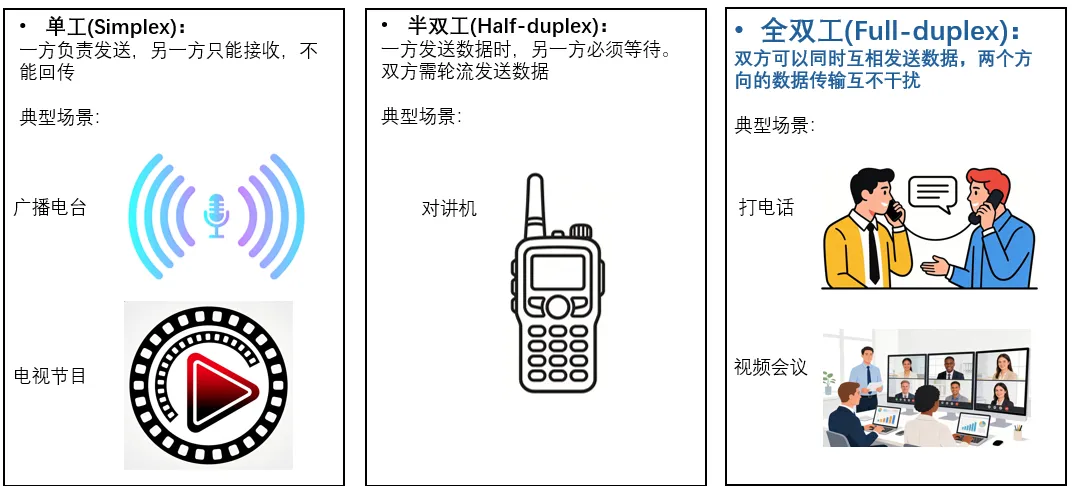
From a user's point of view, a traditional voice assistant is more like a talking machine: when the user finishes a sentence, the AI can talk; when the AI speaks, the user intercepts, they are often interrupted or ignored. Both are similar to making a phone call: the AI can listen, speak, the user can interrupt at any time.
OpenJiuwen is an open-source AI Agent platform jointly built by teams such as Huawei 2012 Laboratories, Huawei Cloud, Terminals, Computing, and Computing Pioneers teams, universities, enterprises, and other large-scale developers. WorkSwarm is an open-source office coding unified workstation that provides real-time audio video interaction with the Core Agent to perform the same access task: users can display a preview image, plug in at any time, or hand over the work that needs to be further processed to the rear Core Agent.
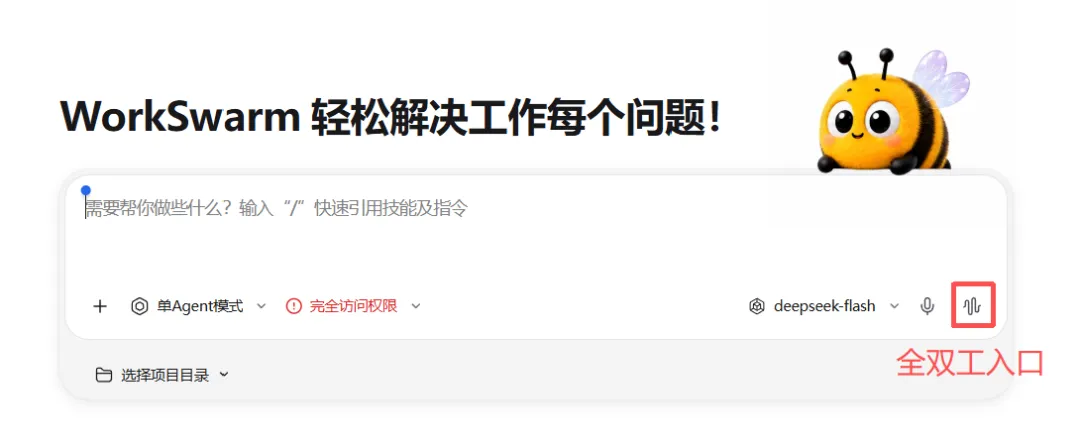
OpenJiuwen offers a one-click installation package for Windows, Mac, HarmonyOS, and other systems that can be downloaded and installed on the official website.
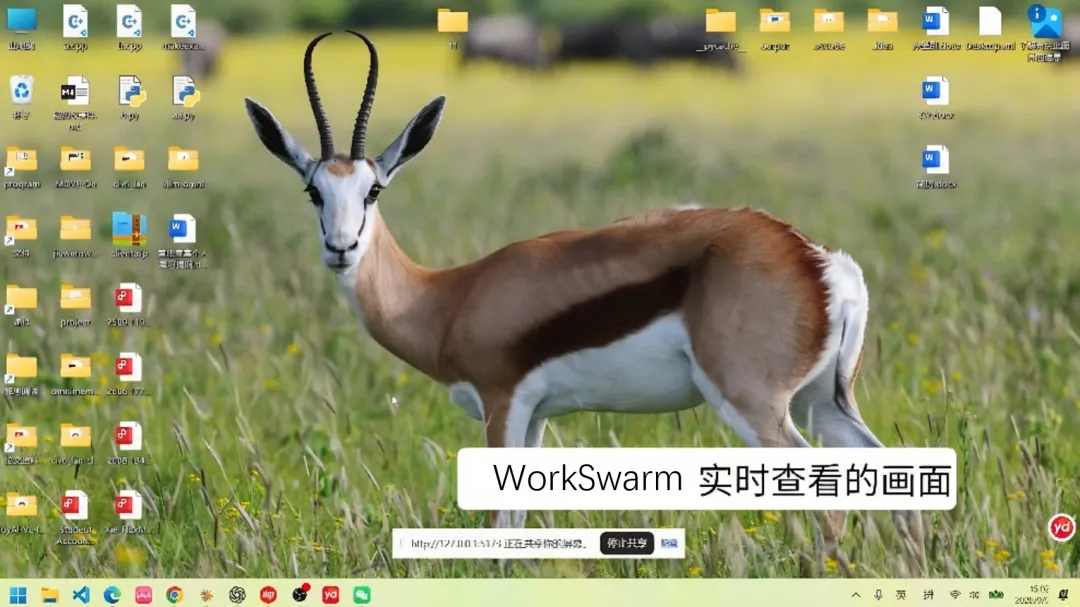
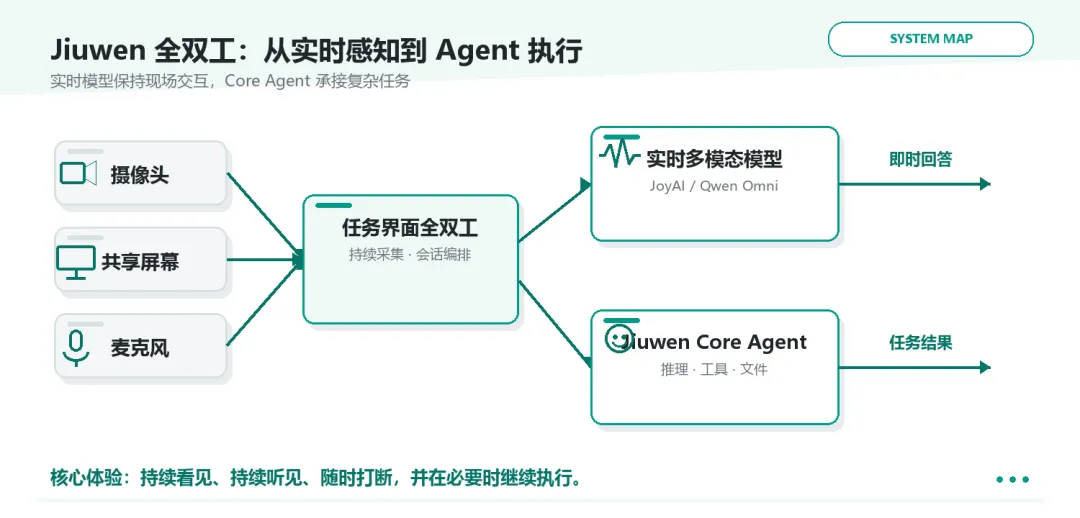
It's like a real-time conversation.
People communicate with each other, rarely strictly adhering to "one thing is said and another is opened". Seeing a new picture, discovering a misunderstanding, or just wanting to listen to the focus, the user directly adds a sentence.
"Don't talk about the background first, talk about the conclusion".
This can be said during a WorkSwarm broadcast. Once a new valid human voice is detected, the system stops the current broadcast and starts processing the new instructions; the generated text remains in the task record. Voice activity detection and noise thresholds are used to reduce the error caused by background noise.
In the video, we asked Agent to read the notes of Yue Yang, and in the process, the voice directly read the sequence of Yue Yang, which can naturally be switched quickly.
The plug-in changes the current dialog. The tool task that has been assigned to the Core Agent has an independent running state, and to cancel it, you have to go to task control separately and stop manually. When the user speaks, the system deals with two levels at the same time: the dialog layer receives the new request and the task layer manages the work that has already been run.
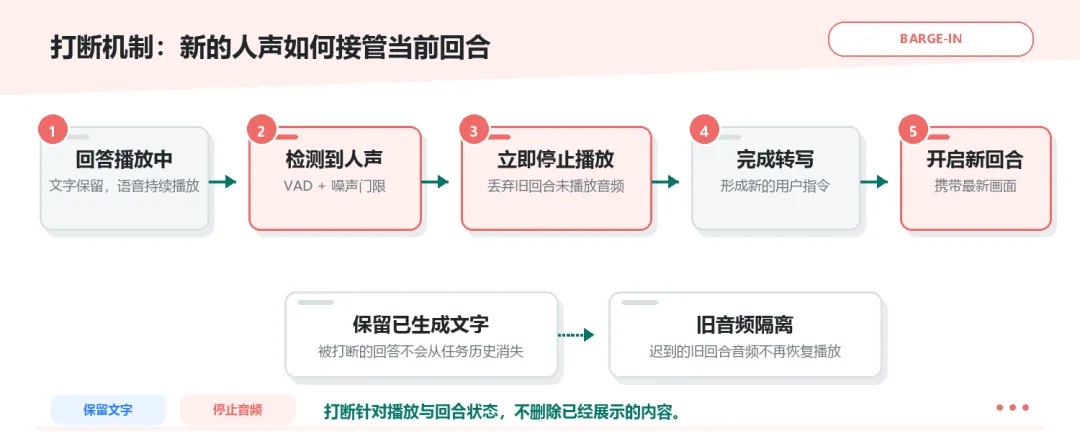
When the user interpolates, the current broadcast stops; new requests continue to enter the same task instead of starting another broken conversation.
It's about talking and doing things.
After "What brand is this?" the user may add a sentence: "Take a look at the information and put together a document".
A graph viewing problem becomes a task that requires searching, analyzing and generating files. While the data is not yet viewed, a new user problem may have arrived.
WorkSwarm takes these two paths: the real-time model is responsible for viewing images, listening to requests, and responding in a timely manner; the core agent is responsible for dismantling tasks, calling tools, and moving the follow-up work forward.
The search is running in the background, the conversation continues in the front. The user can still query the image in front of him, and can interrupt the broadcast at any time, add requests.
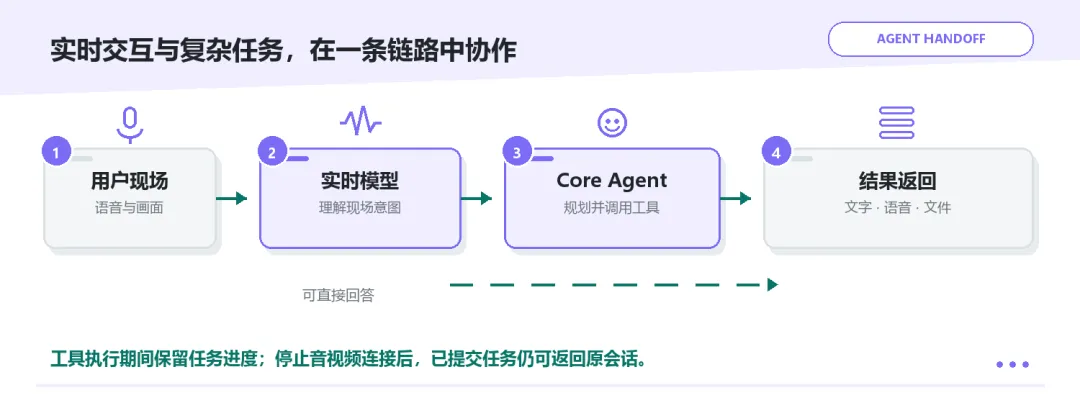
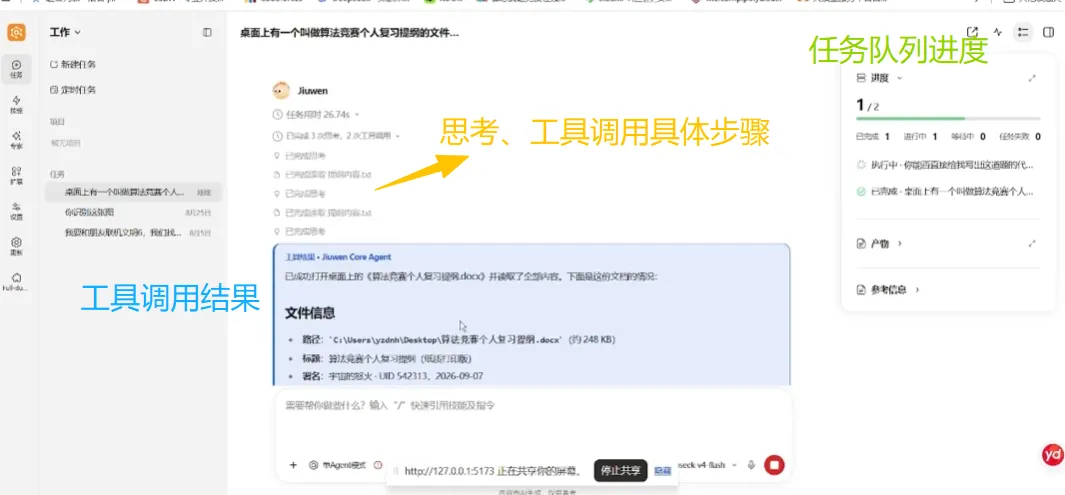
When the task enters the Core Agent, the page continues to show the status of the task, the tool calls records, execution results and file products. What users see is not just a rotating "load", but how things are moving forward.
In the video, we send him a task to read our algorithm word documentation by calling through the tool, in which we can see the task running in the task queue at the top right, and we can talk to the agent normally at this time.
After the task is completed, we don't interrupt the conversation, but we will first output our summary information in the text box (see below) and then at the end of this round of conversations, we will report the work, saying that the work of summarizing the document is done, and that, like human reporting, important information is extracted, not all the information is voice output.
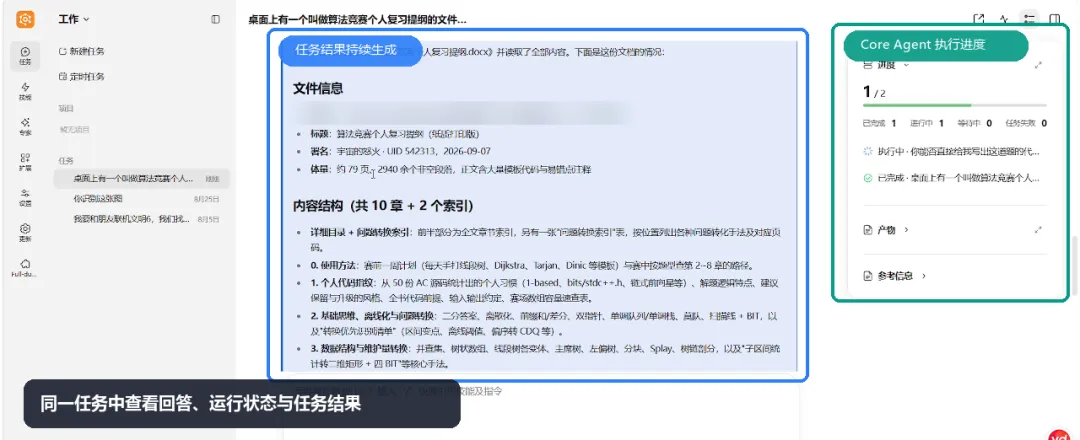
In the real-world interface, the real-time response, the operating status of the Core Agent and the end result return to the same task.
It's all about talking about what to do and what to do.
The first search is not finished and the user switches to the second thing, what happens?
WorkSwarm's full dual task queue provides a waiting location for follow-up requests. Users can adjust the order and set a task to the next; they can also stop a task that is waiting or is being executed. As the conversation continues, what is being done and what is not yet started is clearly stated.
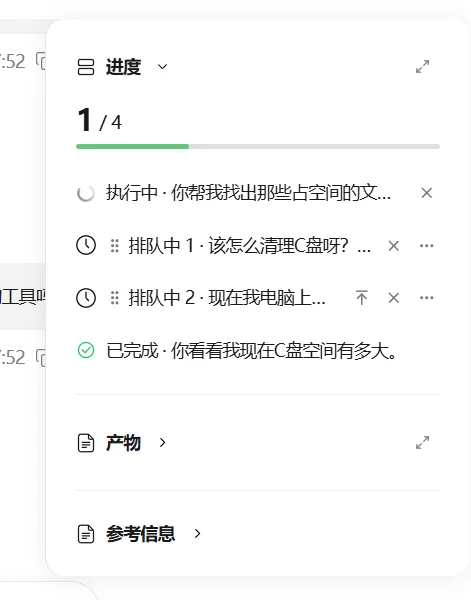
In the upper right corner, we can manually move the order of each task, thus scheduling the running queue, and directly tap a button to disconnect the existing running task.
The audio video connection and tool tasks are also managed separately. The tasks that have been submitted to the Core Agent can continue to be executed even when the full audio video is turned off. The completed text, tool results and files will return to the original dialogue.
For example, after launching a brand query through a lens, users can end the audio-video interaction and come back later to view the material.
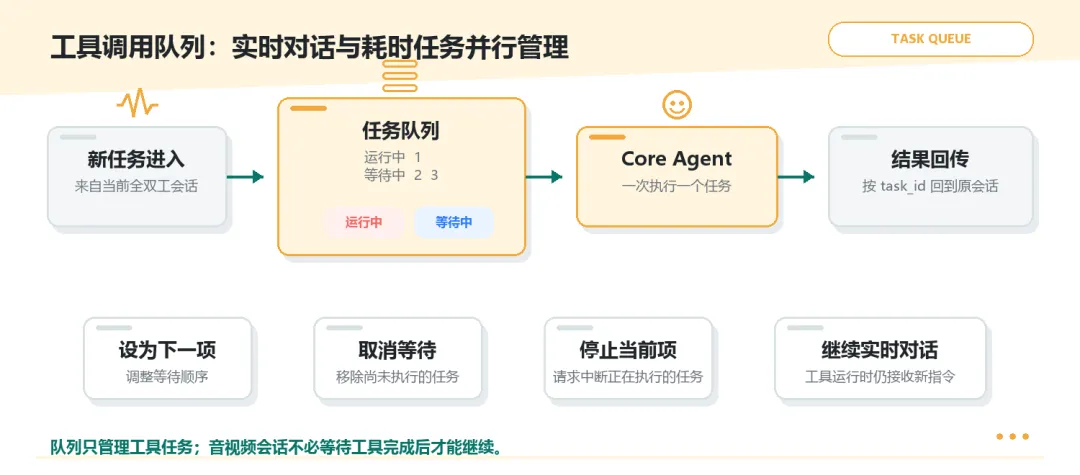
Tool tasks can be lined up, adjusted and stopped; audio-video connections to background tasks are no longer simply tied.
WorkSwarm's multi-modal capabilities mean that not only is AI able to "listen by the sidelines", but real-time conversations run in real parallel with the backdrop of the Core Agent: users interrupt, query, supplement, and complex tasks continue to search, tune, analyze at their own pace on the backdrop.
How to use:
1. Models and voice channels can be configured in settings
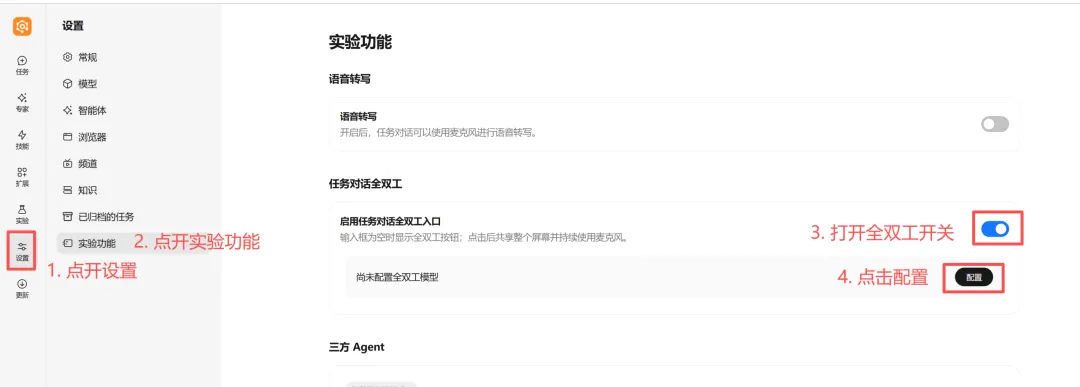
Currently supporting JoyAI and Qwen Omni protocols, you can click on the model channel to switch.
a) Qwen Omni realtime websocket can be filled with the official database_url or local deployment address
(b) JoyAI is a three model spelling (ASR, LLM, TTS) so it supports all three models using officialapi, or other platforms' ASR and TTS models.
Additionally, it supports the use of the Huawei Cloud ModelArts platform, based on the vLLM-Omni logic framework, to deploy full-domain multi-module models in the Ascension NPU series, and to pair the WorkSwarm multi-module full-domain capabilities.