Over the past year, Agent's discussion has largely revolved around the model itself: stronger reasoning, longer context, and more stable tool calling. But after entering the real workflow, another question began to become more critical: where does Agent's ability come from and how is it continually replicated?
Today, many Agent products still use the capability as a closed built-in feature. Users can temporarily write Prompt, temporarily receive MCP, temporarily call tools, or pull up multiple Agent collaborations in a single task. But these capabilities often remain in the current session and current projects, and it is difficult to commit to the assets that can be used the next time the task is completed.
This is also a problem that must be addressed when Agent moves into a production environment. Businesses and developers need not only a smarter dialogue input, but a scalable system of capabilities: capabilities that can be created, installed, assembled and used, or released into the ecosystem by more people to replicate.
OpenJiuwen's answer is to break down the capabilities surrounding the Agent into the five categories of skills, connectors, plugins, experts and expert teams, so that once-in-a-lifetime experiences of the Agent become manageable, reusable, and shareable assets.
OpenJiuwen is an open-source AI Agent platform jointly built by teams from Huawei 2012 Laboratories, Huawei Cloud, Terminals, Computing and Computing pioneering teams, universities, enterprises, and other large-scale developers.
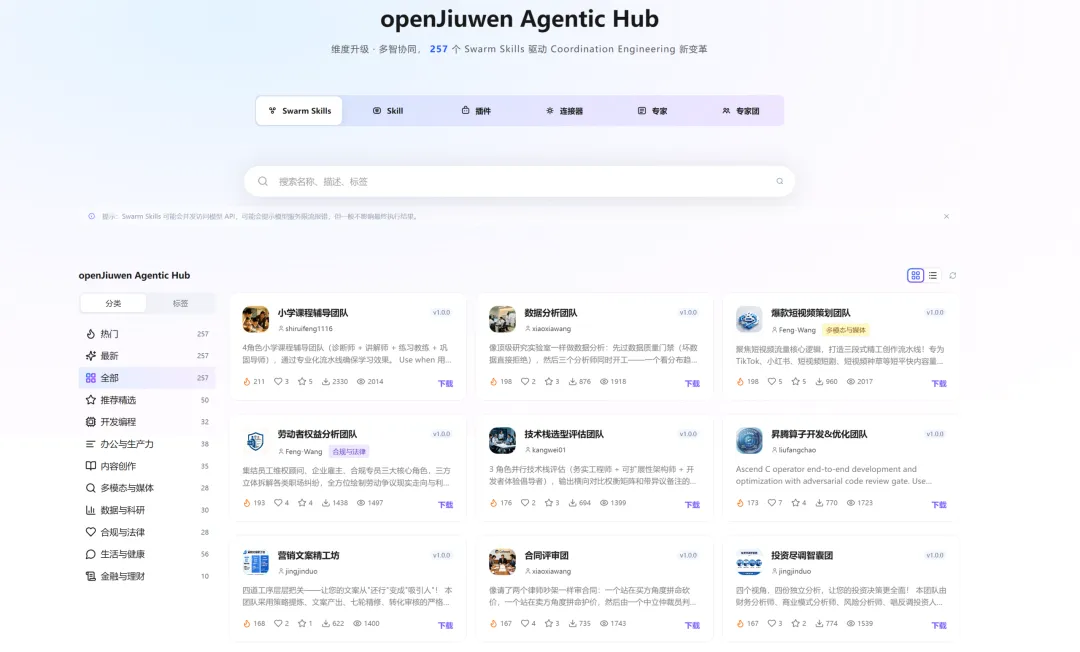
Agentic Hub:
How Agent Resources Form an Ecological Closed Circle
In openJiuwen, resources are not a one-time configuration, but go through the entire lifecycle of creating, installing, using, releasing, and retrieving them. The use phase can overlay a combination of experts, plugins, skills, and connectors.
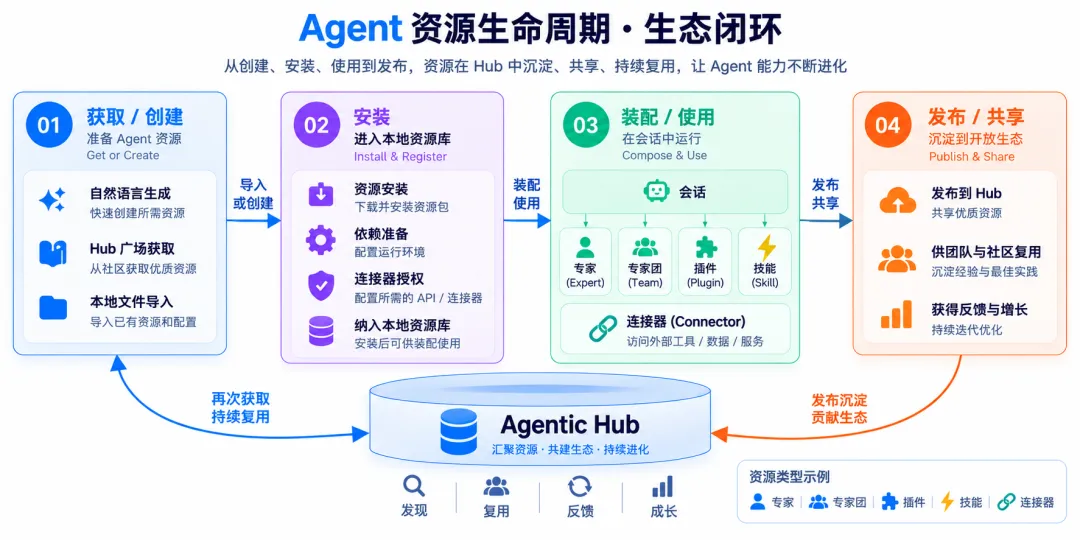
These five categories of resources deal with different problems: skills embedding methods, connector access to external systems, plug-in porting capabilities, expert role definition, expert team organizational collaboration. They are not five interchangeable agents, but rather resource units that can be used around a portfolio of tasks.
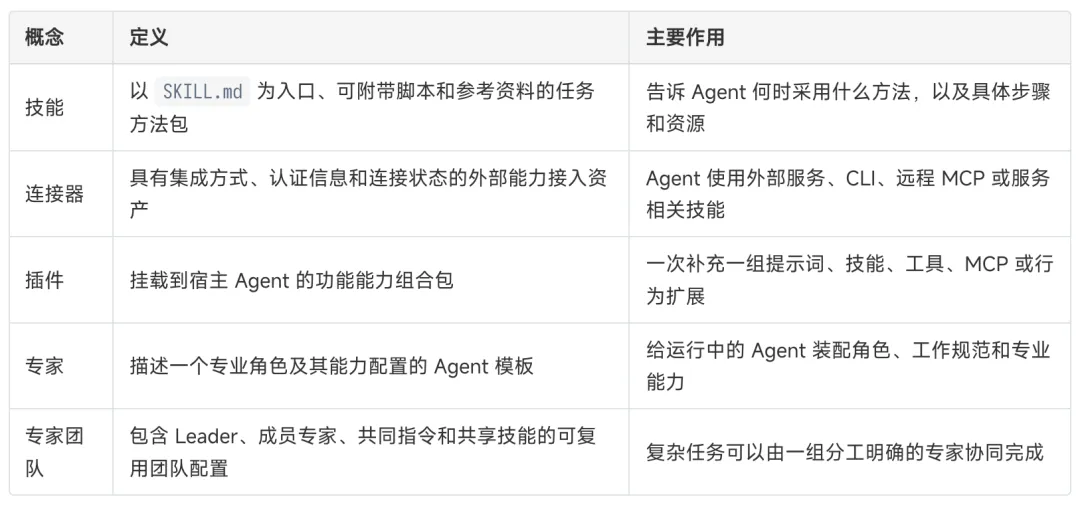
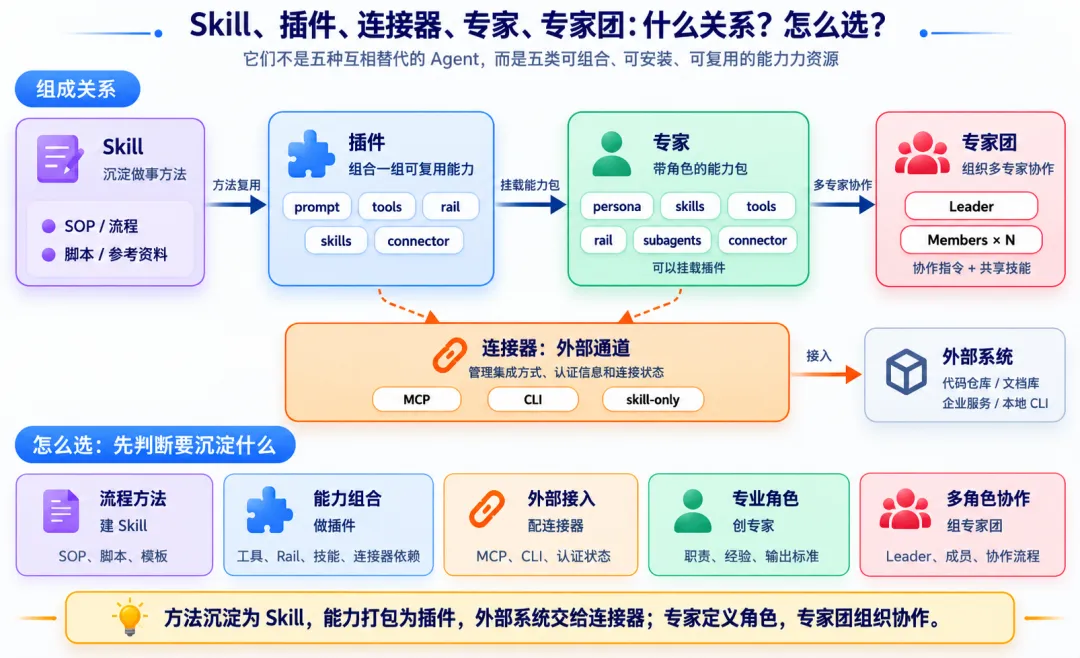
Five types of resources are detailed:
Skills, connectors, plugins, experts and teams of experts
The five categories of resources correspond to the different levels of the Agency's tasks: skill deployment methods, connector access to external systems, plug-in porting capabilities, expert role definition, expert team organizational collaboration.
1 Skills: Embedded ways of doing things into reusable resources
In many Agent scenarios, what's really worth checking out isn't just one answer, but a set of stability approaches: code review to look at change objectives first, then call chains and testing; PPT production to extract materials first, then organize structures and visual styles; document processing to identify formats first, then perform conversions, calibrations, and exportations.
OpenJiuwen's skills can be entered as SKILL.md and can be accompanied by references, scripts, templates, and multimodal resources. It's like an installation capability manual that tells the Agent what methods should be used in what scenarios, what resources to read, and what tools to call.
WorkSwarm currently identifies three types of skills:
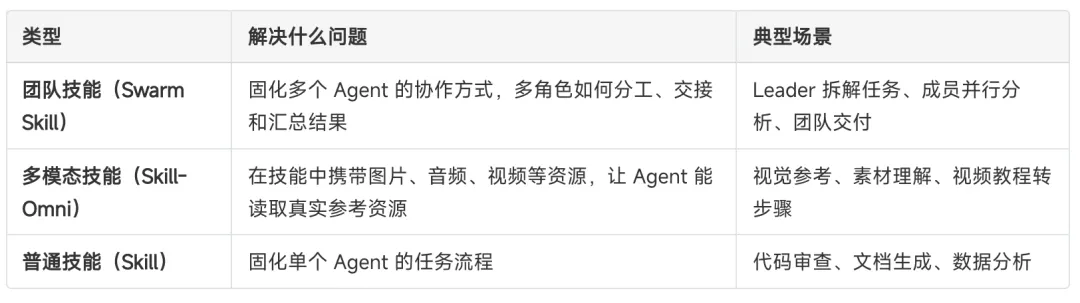
When creating skills, as long as the user describes the needs in a unified input skill-creator, WorkSwarm selects the appropriate way to create based on the target type and generates skill resources that can be installed:
Team Skills: Aimed at multi-role collaboration, character-sharing, collaboration processes, and dependency relationships created by swarmskill-creators; SwarmFlow scripts can also be added if necessary to execute editing;
Multimodal Skills: When materials come from URLs, web pages, or videos, skill-omni-creation extracts text, images, or video clips and packs them together with reference resources to create supporting scripts when necessary.
Common Skills: Processes, SOPs, scripts and references for individual Agents, compiled by skill-creator-normal;
If the boundaries of demand are unclear, the system will not force a path selection, but will first confirm whether the user is preoccupied with a single Agent method, a team collaboration process, or multi-modal experience from web pages/video.
OpenJiuwen also provides the ability to automatically evolve local skills. After agents use the skills to complete tasks, WorkSwarm can generate experience records based on execution processes, fail signals, or user feedback; these records do not directly cover the original skills, but are embedded in local experience documents and skill indexes, which are read the next time used, helping the skills get closer to the actual task.
There is more than one way to acquire skills. Mature skills can be installed from Hubs or Skills Square; enterprise internal skills can be transmitted locally, through local pathways or through resource packages; experts, plugins and expert teams can also carry skills to make a set of methods part of a larger capability package.
How to use Skill: Go to the Skill Management page → Install Skill from Skill Square or select Skill in My Skill → Enable/Off Skill → Click on the button to take a test of Skill to enter a session → Activate Skill in natural language to complete tasks → The task experience continues to sink locally.
2 - Connector: Let the Agent access the external real system
In order to access the real workflow, an agent cannot just stay in a dialog box, it needs access to code repositories, enterprise documents, databases, internal services, or local development tools. The connector is to turn these external systems into manageable access resources, with unified modes of integration, authentication information, and connection status.
In openJiuwen, connectors are mainly available in two ways: one is to access mature connectors from the Hub and directly replicate the external system capabilities of the community or organization that are already adapted; the other is to configure their own connectors in the WorkSwarm client to connect to the enterprise's internal system, local CLI or custom MCP services.
Connectors can cover different forms of integration:
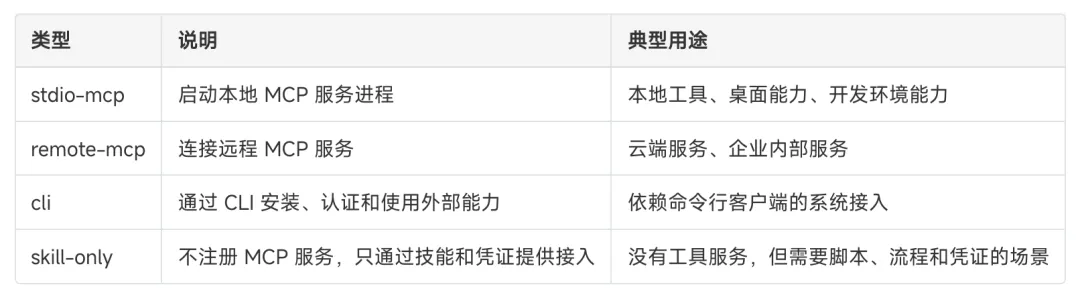
How to use the connector: Go to the connector management page → Get a mature connector from openJiuwen Agentic Hub → Complete the connection and certification → Access external systems in the Agent task.
3 Plugins: Pack a set of capabilities for Agent to use
Plugins are more like a bundle of capabilities when it comes to skill-building methods, connectors that connect to external systems. They can organize prompts, tools, rails, skills, and MCP capabilities together to give the agent a complete set of enhancements while performing tasks.
A plug-in can usually include:
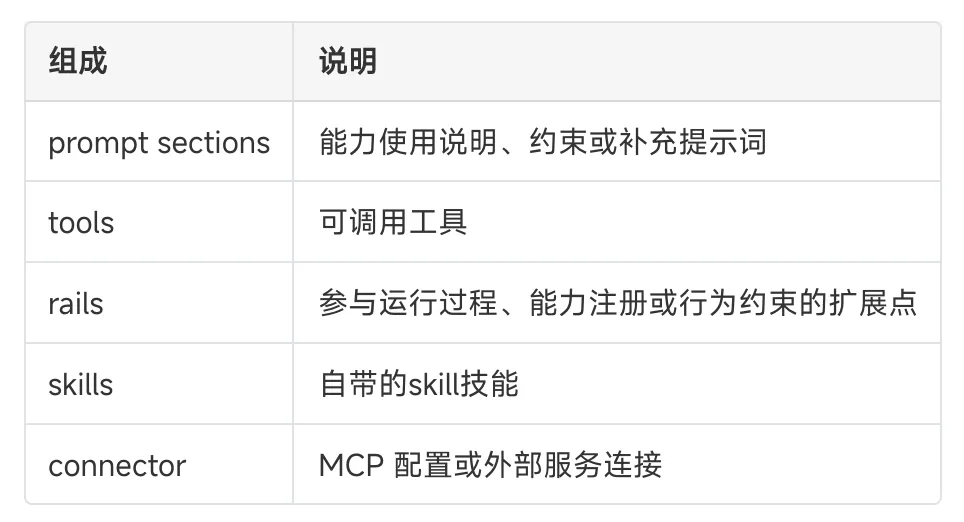
The value of plugins lies in reuse. Such as Office document processing, embedded engineering construction, code quality checking, knowledge base retrieval, should not be limited to one expert. They can be made into plugins and installed by different experts or base agents on demand.
Plugins can be created and accessed in a variety of ways. For example, they can be created through chat: users need only describe what capabilities they want to add to Agent, WorkSwarm will automatically use a plugin-creator, organize natural language needs into loadable plugin packages, and complete initialization, filling, validation, and registration. OpenJiuwen Agentic Hub provides a wealth of mature plugin resources that users can install directly; enterprise internal plugins can also be delivered on-premises.
How to use plugins: Go to the plugins management page → Create plugins via chat, or install mature plugins from openJiuwen Agentic Hub → See the tools, skills or connector capabilities contained in the plugins → Install and use in Agent/Expert tasks.
4 Experts: Role-playing skills package
Experts have solved the question of who is going to be the agent. More specifically, it defines the role of the agent in the task, the boundaries of the task, the way the agent works and the ability to be called upon.
In many Agent products, experts tend to be just a part of the Prompt role, for example, you're an architect, you're a test engineer, you're a test engineer. This way you can get started quickly, but the role setting, tooling capabilities, job specifications, and external dependencies are scattered around, making it difficult to replicate and manage.
The experts in openJiuwen are closer to an installed Agent template. It packs the identity, responsibilities, output standards, and capability configurations of a professional role, allowing the Agent not only to temporarily play a role but to load a stable set of role capabilities.
An expert can usually include:
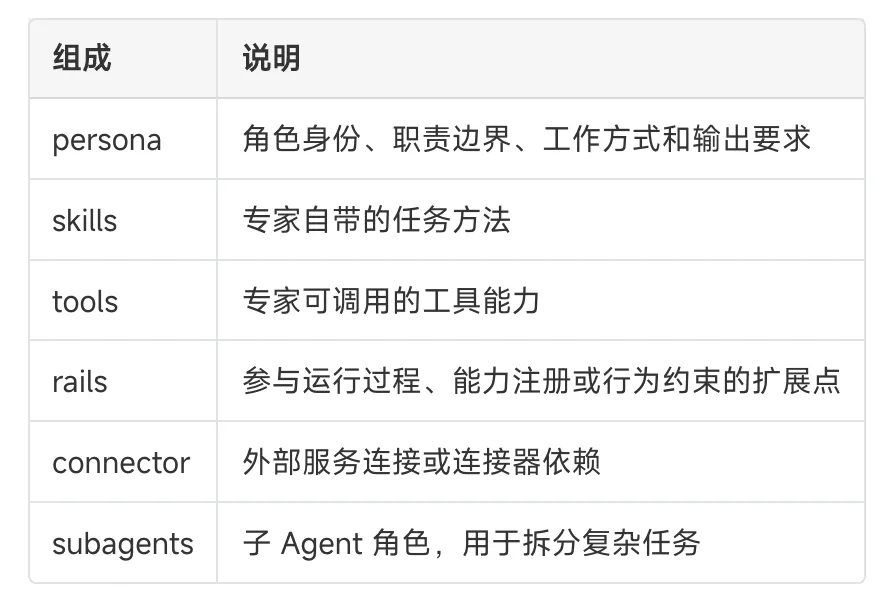
There are many ways to create and acquire experts. Users can create experts directly through chat on the Expert Management page: describing what area of expertise you need, what tasks you are good at, what skills you have, and using a skill agent-creator to convert user's natural language needs into loadable Agent templates. Users can also upload expert resource packages directly through files; openJiuwen Agentic Hub also provides mature expert resources that users can install directly.
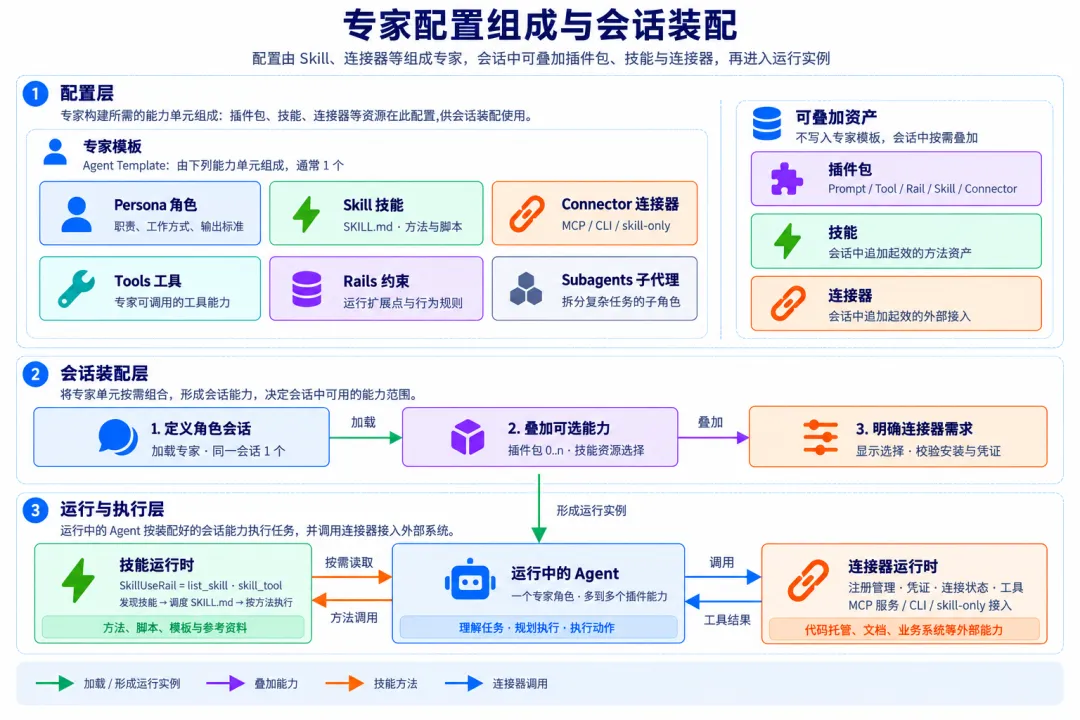
This diagram helps to understand how the single Agent scenario is set up: experts provide a role baseline, plug-in overlapping capabilities, skills provide method resources, connectors are responsible for external system access.
It is important to note that an expert is not an agent that is already running, but a set of role templates that can be loaded by the session. Only when the session selects this expert will the agent in operation receive the corresponding role, rules and capability configuration.
At the same time, openJiuwen's expert system is also geared towards an already open ecosystem. WorkSwarm can be reused for other industry platforms (such as WorkBuddy, Thousand Questions Office, etc.) where expert assets can be converted into openJiuwen's expert resources.
How to use the Expert: Go to the Expert admin page → Create forms / Create Natural Language Experts / Install mature experts from openJiuwen Agentic Hub → Click on the mouse to enter the session → Overlay plug-ins on-demand → Complete tasks in natural language, as specified by the expert.
Five: Team of experts: Get multiple experts to work together on complex tasks
Once these expert assets are managed in a unified manner, they can be further organized into teams of experts.
Individual experts are well suited to dealing with border-clear tasks. However, real projects often require multiple role collaborators: someone to dismantle needs, someone to implement, someone to test, someone to deliver. In the past, such multi-agent collaborations often depended on temporary Prompt sorting to be demonstrated, but were difficult to replicate.
OpenJiuwen makes collaboration itself a resource. Expert teams can directly use existing teams of experts, where the Leader is responsible for understanding objectives, dismantling tasks and aggregating results, while the member experts individually undertake professional work such as development, testing, documentation, review. Teams can also configure instruction and sharing skills so that collaboration processes no longer depend on live performance.
A team of experts can usually include:
In WorkSwarm, you don't have to start from scratch to build a team of experts. The most direct way to do this is to bring existing experts into the same team: select one expert as a leader, select multiple experts as members, complement team goals, collaborate descriptions, and share skills, so that a team of experts facing complex tasks can be replicated.
If the user doesn't yet understand how the team should work, using only natural language to describe the task objectives, WorkSwarm can automatically generate a complete expert team package with built-in agent-group-creator skills: automatically output Leader, member role definitions, multi-party collaboration instructions, and a selectable pool of shared skills.
WorkSwarm also supports file-to-file transfers for well-established team configurations; a mature team of experts in the openJiuwen Agentic Hub can access their workflow directly after installation.
The relationship between experts and expert teams is a relationship of role models and collaborative configurations. When creating expert teams, the system organizes selected experts into team resources, adding team direction and sharing skills; when running, reassembled into a collaborative form of Leader + Members.
When running, the Leader is responsible for disassembling, coordinating and aggregating, with the member experts each taking on the professional role. The team of experts maintains a set of repeatable initial collaborative configurations, rather than a fixed, unchangeable workflow step chart.
Therefore, a team of experts should not be understood as a larger group of experts. It is more like a set of collaborative configurations, organizing multiple experts so that complex tasks can be dismantled, handled in parallel, and delivered uniquely.
How to use Expert Groups: Go to Expert Management page → Create forms: Select already existing experts, Direct Groups / Natural Language Groups→ Click Use Go to Team Meetings → Leader Dismantle tasks, Member Experts collaborate → Leader Summary Results and Unified Delivery.
Resources released:
From local capabilities to ecological assets
OpenJiuwen uses publishing as part of a resource lifecycle. Locally verified capabilities can be uploaded to the Agentic Hub and become public resources that can be searched, installed and shared. There are two ways to publish entries.
1 - Release directly from the WorkSwarm client
In the WorkSwarm client, users can post locally verified skills, connectors, plugins, experts and expert teams to the Hub.
Published from everyday use environments: Create and verify skills, connectors, plugins, experts or expert groups → Published from the Resource Details page to the Hub.
2 - Post to the community on the Hub
Submit a well-organized resource package directly to the Agentic Hub website and distribute mature capabilities to the community.
OpenJiuwen Agentic Hub directly publishes the resources.
From one expert to a team of experts, run real missions
The following two cases respectively correspond to two typical scenarios: when the boundaries of the task are clear, an expert with Skill and connectors can complete the end-to-end delivery; when a problem requires multiple professional perspectives, multiple already existing experts can be organized into teams of experts to complete analysis, judgement and synthesis together.
Case one: The development of applications for black hole swallowing and swallowing was completed with the help of application development experts.
This case demonstrates how a single expert completes end-to-end application development. Users choose to use natural language to present the needs of Black Hole Applications, where experts combine their own human settings, develop Skills and connector capabilities to complete the development of the application, real-time deployment, back-end deployment and secondary modulation optimization.
Developer Demo: Device confirmation → Deployment of Deployment of Deployment of Deployment of Deployment of Deployment of Deployment of Deployment
Example 2: Put together a team of local experts to create a puzzle puzzle puzzle.
This case demonstrates the collaborative capabilities of the expert team. Users can combine multiple experts who are already engaged locally to form a complex task-oriented puzzle: each member of the team retains their own role, manpower, skills, and connector capabilities, with Leader responsible for dismantling tasks, allocating problems, and summarizing conclusions.
In this model, teams do not temporarily allow an Agent to play multiple roles, but instead organize existing expert assets to work together. As members come from local experts, the Skills, tools, and connector capabilities that each expert originally carried can also continue to play a role in team collaboration.
Select local experts → Create a team of experts → Dismantle tasks → Member experts analyze → Summarize the output of a unified conclusion.
What is the meaning of this verse?
Agent capabilities are becoming a circulating resource
The value of an agent is moving from instant response in a conversation to deployable, deployable, deployable assets.
OpenJiuwen breaks these capabilities down into five resources: skill deployment methods, connector access systems, plug-in combination capabilities, expert role-defining capabilities, expert team organizing collaborations. Together, they form a complete lifecycle: create/acquire → install → install use → publish/share → retrieve.
This is also the Agent resource ecosystem that openJiuwen wants to promote: developers, businesses and communities can collaborate, deploy and reuse Skills, connectors, plugins, experts and teams of experts, making every mission experience the starting point for the next smart collaboration.
At the same time, we observed that many customers and partners are already participating in openJiuwen co-creation. openJiuwen × FAB smart finance area revolves around open architecture, open assets, open computing power, upgrades to the FAB 2.0 financial intelligence accelerator, promotes engineering process asset replication, shared sharing; releases the financial hub Token full lifecycle operating program, builds an efficient, sustainable computing power supply system.
Related Resources:
OpenJiuwen official website:
Agentic Hub:
This is the first time I've seen this.https://github.com/openJiuwen-ai/jiuwenswarm
AtomGit code stores:
Link to the Financial District: