
It's the first time in the history of the world.
On August 26, Claude opened his own browser.
When you say "pull this month's invoice out of the supplier's gateway" at Cowork, Claude judges that it's live online, and the sidebar automatically opens a browser window.
It browses through the web pages, points to the links, enters the input box, completes a single form, and you're looking next to it without cutting the window.
You don't touch the browser you use every day, Claude.
The open tag pages, bookmarks, logins are all in place, and you're still doing the same thing in the original window.
The official tagline is: This is Claude's browser, not yours.
On the same day, Claude in Chrome also completed its pilot, officially opening to all paid packages.
Just 17 days ago, OpenAI shut down its own AI browser, Atlas.
The product only lasted 292 days from its launch to shutdown.
OpenAI spent 292 days trying to insert AI into the browser, but eventually gave up.
Anthropic's opponents have plugged the browser into AI.
On the side.What is it doing?Once Claude's task involves a website, the sidebar automatically opens a browser.
Claude opens the site, reads the page, clicks, enters, fills in the form, you can see it all, and it's not used to reverse the window.
The links in the task logs, which are also opened in the same sidebar, will not lead you to another window.
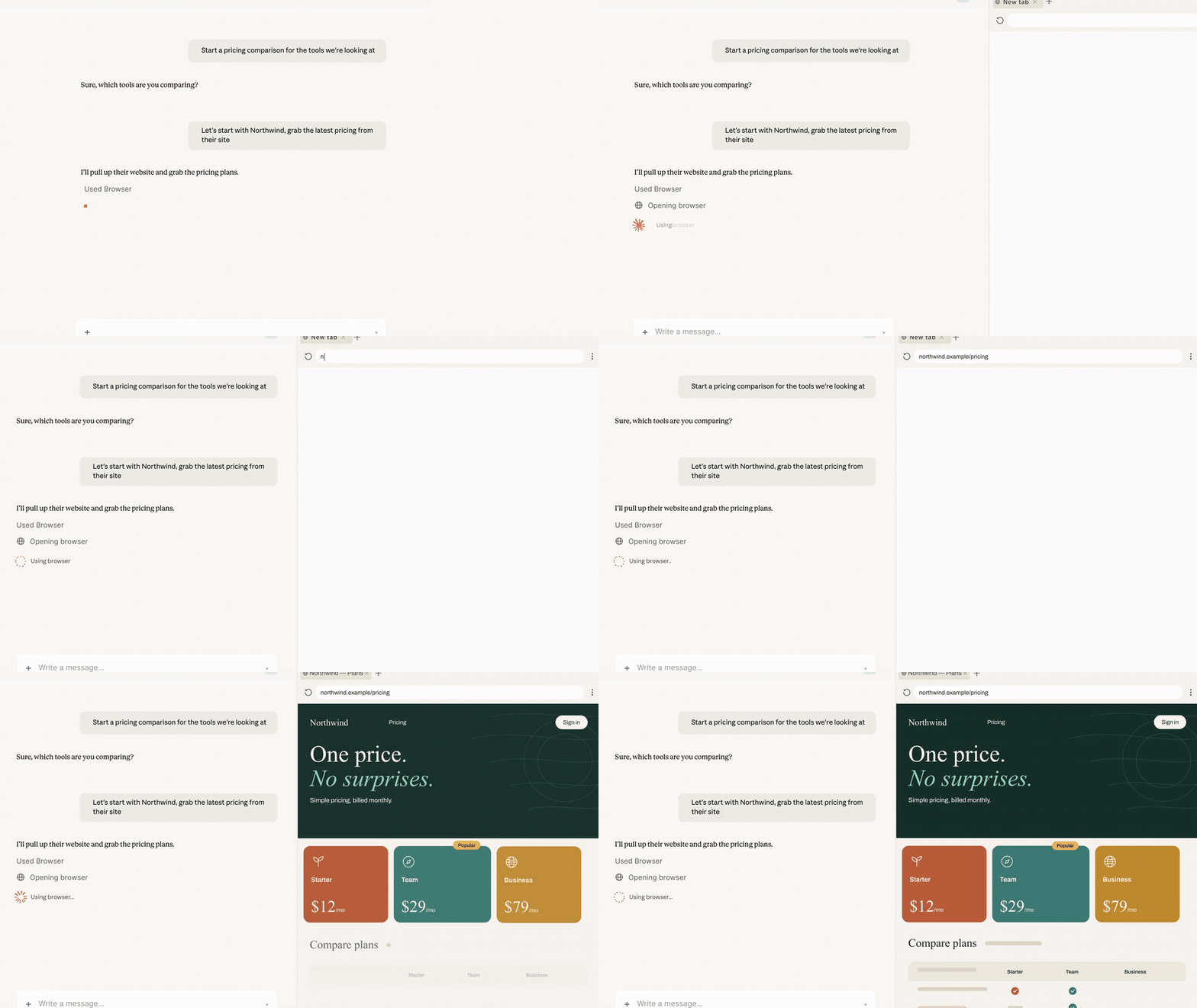
It's one of the most boring things you've ever done in your life, and it's the kind of life you need to move your mind about.
Give a report receiving research material, pull the invoices from the supplier's portal this month, run a portal with no root connector.
Folding dozens of pages, copying the numbers one by one, and then filling them in three times in the same sheet, which can now be lost.
PreviouslyIt needs to borrow your browser first.Prior to that, there was only one way in which Cowork wanted to hit the web: install the Claude in Chrome extension and use your own browser to do so.
It's been a long time since I've worked on a web page, and it's been good enough.
But the problem is another type of live: there are no connectors, there are no old systems with APIs, and there is no other door except the browser.
For example, a decade ago, an internal billboard, a supplier's billing gateway, an approval page in the administrative system that had to be manually moved to point seven...
The real day-to-day life of most companies is running on this pile of old interfaces that no one wants to mention or dare to move.
If you're smart enough to go this far, you can just stop and scream.
An Anthropic phrase breaks through this layer of window paper: many web tasks don't need your browser, they need an AI-enabled browser.
Two browsersThey live each other's livesClaude in Chrome has changed more than just open scope.
At the same time, it received the permission to perform the actions autonomously, and was released by a security classifier after a step-by-step test.
When it debuted as a pilot last year, the reason Anthropic gave was to fill in the small-scale injection line. A year ago, it dared to open the door to all paying users.
The automatic approval mechanism is the same as the auto mode in Claude Code: the classifier blocks Claude's actions by comparing them to what you originally asked for.
Those who are uncomfortable can turn it off in the settings and withdraw the manual approval step by step.
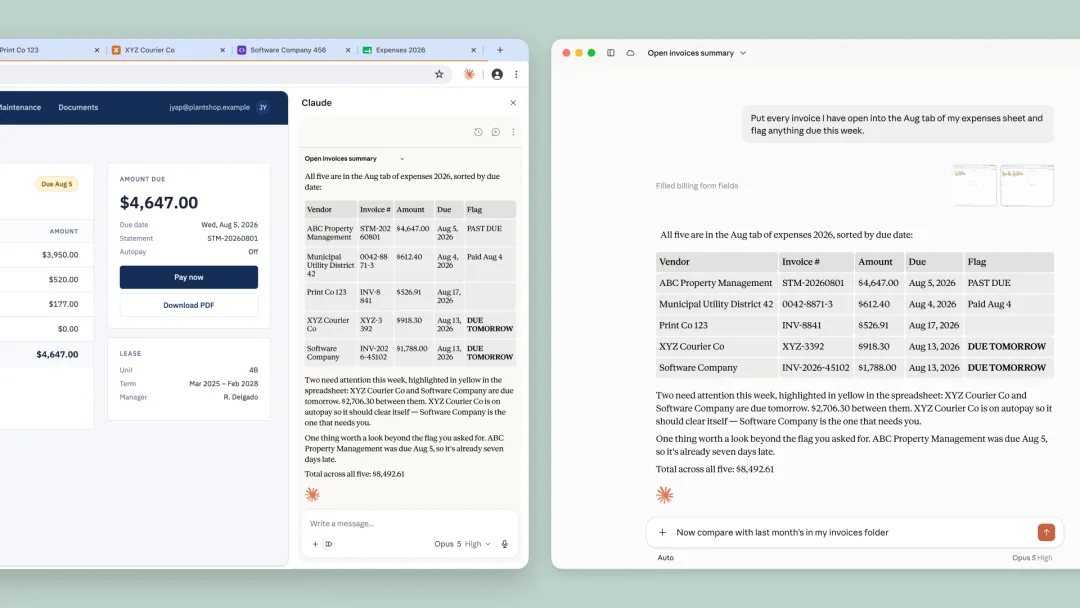
Claude in Chrome completed the pilot on the same day, open to all paid packages, and the actions can be executed autonomously, checked step by step by the security classifier.
The two browser routes are divided as follows:
The built-in browser is responsible for "giving out": researching, receiving invoices, filling out forms, you don't have to sit around and do anything else;
Claude in Chrome is responsible for your current web pages: already logged-in CRM, full of unread mailboxes, changing online documents, what you upload, what it can do for you.
Those who have installed the extension are running Chrome by default; those who have not installed are using the built-in browser by default.
In the settings, you can change your preferred browser at any time.
It's not completely isolated.By default, Claude can't see your tag page, bookmarks and passwords, and the built-in browser and your own browser are separate sets.
But it also left a voluntary message:
You can import cookies from the site and move the log-in status. On macOS, you can import from Chrome, Edge, Firefox, Windows and Linux test versions currently only support Firefox, while Safari does not support it.
By default, banks, mailboxes and SSO sites are not selected. It is not prohibited, but you can also select if you need to.
It's also important to note that the account you logged into in the built-in browser, after which the task of Cowork on this computer, Claude can continue to use.
Today's backstage, next week's mission, it's going in the same way.
Anthropic's prevention measures are in three layers:
The probe scans the content of the web page and blocks it directly from your original request to the high-risk site before performing the action.
The probe is larger than the correct attack library, which comes from Anthropic's internal automated attackers, external red teams, and real-world monitoring.
The latest official assessment gives a set of figures:
The success rate for Opus 4.5 was 17.6%, down to 3.8% for Opus 5 without additional protection; Sonnet 5, Opus 5, Mythos 5 were squeezed to zero after adding probes and security classifiers, and Fable 5 was 0.3%, all of which were artificially identified as low-risk scenarios.
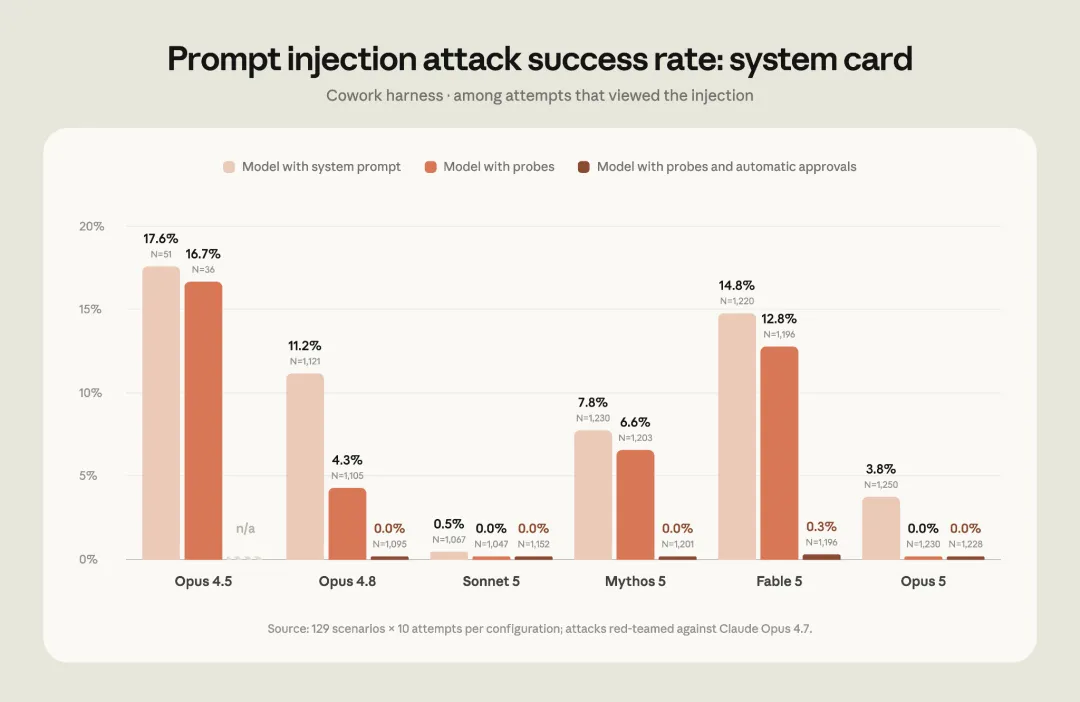
After overlapping the probe with the security classifier, the Sonnet 5, Opus 5, Mythos 5 attack success rate was zero and Fable 5 0.3%.
Anthropic itself has put the risk ahead: these measures can significantly reduce the risk, cannot be cleaned, and suggests the injection is always a mobile pump.
What is stopped today will not be stopped tomorrow.
The helpful document also warns against using a built-in browser or Claude in Chrome to process financial accounts, medical information and other personal data.
The official advice is to start with a website that you trust and stop doing anything that involves money and personal information if you don't see it right.
Browser degraded to partsAtlas is available on October 21, 2025, with the Chromium kernel, ChatGPT in the sidebar, and agent mode to book tickets and run analysis for you.
The narrative at the time was grandiose: the browser was the new entrance, who took the browser, who took the AI era.
After 10 months, it was shut down.
Atlas was launched on October 21, 2025, and ceased operations on August 9, 2026, for a total of 292 days.
But OpenAI didn't give up on smart browsing, only putting its capabilities back into ChatGPT and the Codex: the form of "independent AI browser" is dead, not the capability.
It's not hard to guess.
For a person to change a browser, it's like getting rid of their bookmarks, passwords, extensions, habits, and entire work identities.
Anthropic went around it, but the footsteps didn't stop:
In July, Claude Code installed a sandbox browser at the end of the desktop, with the Cmd+Shift+B shortcut, clean configuration, and no inheritance of any cookies, to be tested by the developer first.
On August 12, Claude in Chrome's sidebar was upgraded to a full-fledged Cowork session, where tasks can be switched between desktops, web pages, and mobile phones.
On 26 August, it was the turn of Cowork, and the browser pushed the average worker.
Anthropic helps document a tool priority: a connector uses a connector, a browser opens without a connector, and a screen is the last resort.
The browser has never been the protagonist in its product logic, only the connector is not timely enough.
This is why it is not possible: as long as there is a web page, the browser is the all-encompassing interface.
For the past two years, everyone has been asking if AI browsers can get rid of Chrome.
Anthropic didn't grab the input like OpenAI did, but instead made the browser a part of AI.
This question may have been asked wrongly from the beginning.
Smart bodies are starting to have their own jobsBuilt-in browsers are being rolled out over the course of a week, with Pro, Max, Team available, covering macOS, Windows, Linux being the test version.
Enterprise is available on the day, and administrators can open it in organizational settings.
There is also a physical constraint that is easily overlooked.
This browser resides in Claude's Desktop. You can control it remotely from the end of the web or from your phone, but the desktop application must be turned on and online.
For the past two years, we've been measuring a model to see how much more accurate it is, how much deeper it is, how much higher it is.
Browsers, logins, memory that can be stored across tasks, all of which are superimposed on one another, is the workplace of an AI employee.
In the past, an AI that wanted to use a web page had to get into your window first, borrow your login, and take your tag page.
Claude has his own browser and his own job.
The border between humans and AI on the same computer is being redrawn.