Download the GUI and SDK.
 Add tweets and contact advice
Second, what is hand-eye labeling?
We're going to provide a tool forMechanical arm hand and eye markingsProfessional software. With this software, users can calculate the precise space-switching relationship between the camera and the mechanical arm end-executor.
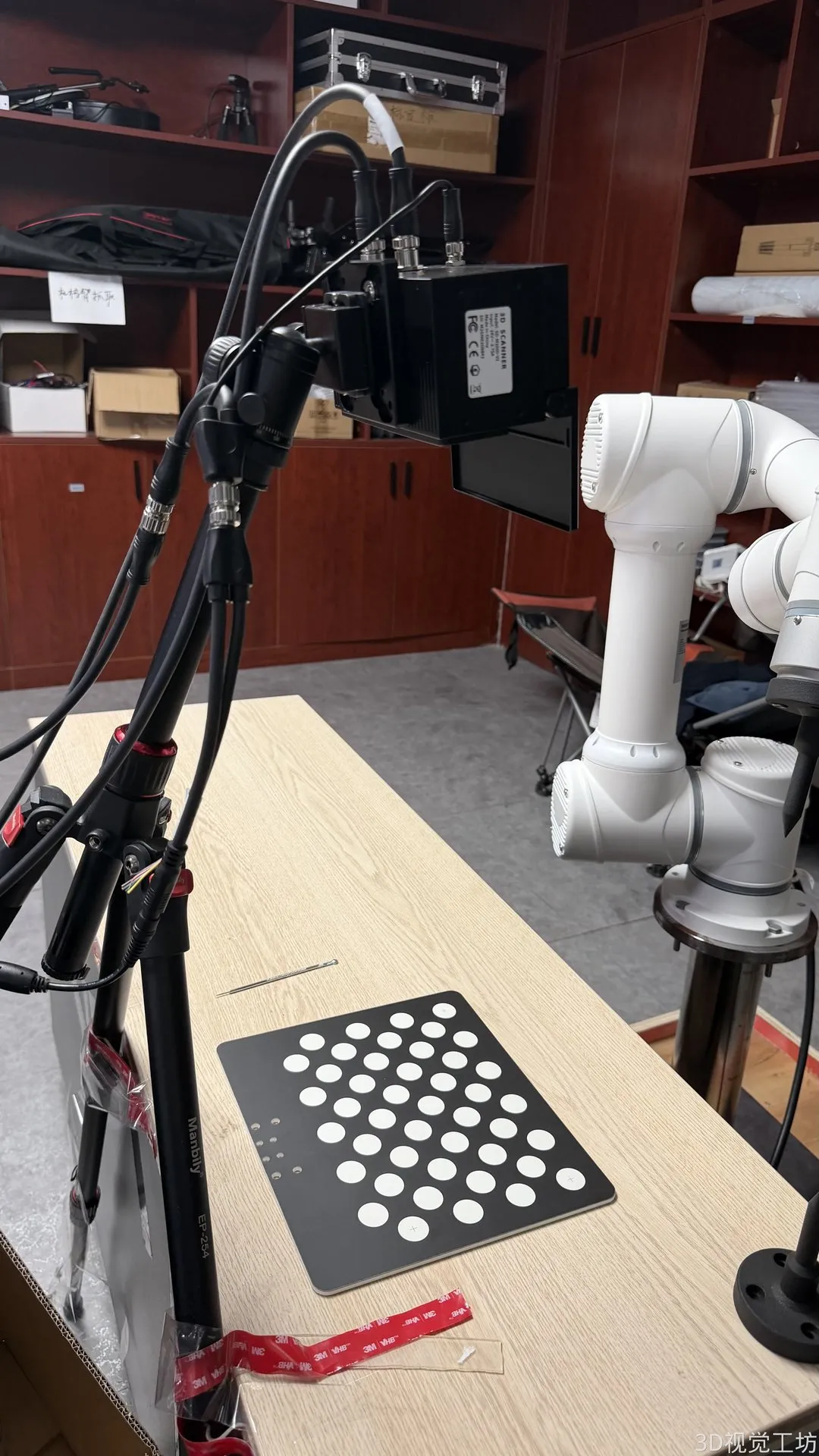
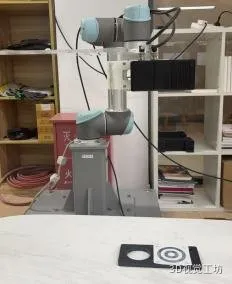
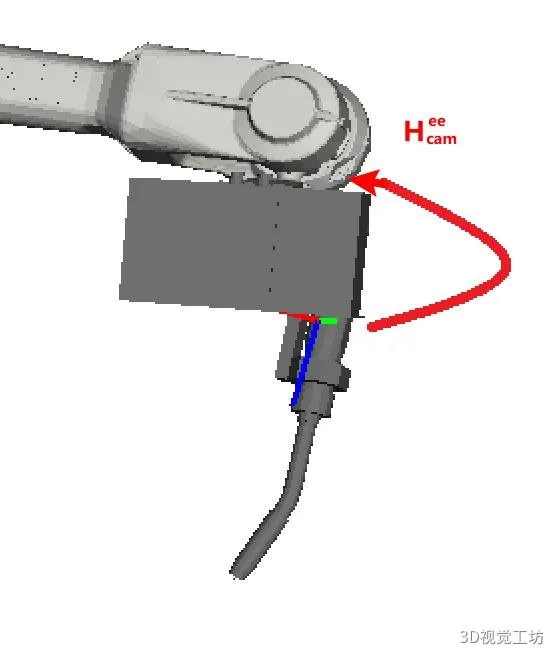 Eye-in-Hand: Camera mounted at the end of the mechanical arm
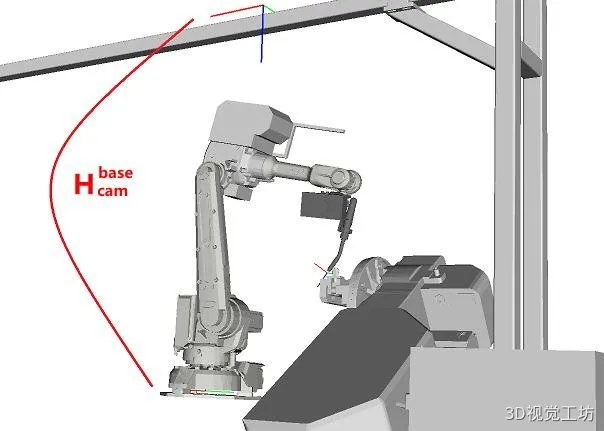 Eye-to-Hand: the camera is fixed to the seat or desk
Three, scheduled preparation
Before the official start of labeling, please complete the following 6 checks on a case-by-case basis to avoid failure due to hardware problems:
3.1 Loading and installation checks
Confirmation of the weight of the camera/marking plate within the rated load of the mechanical arm, installed firmly and unhindered. Overloads may result in deformation or movement abnormalities of the end plate.
3.2 Stability checks at the base
Ensure that the base of the mechanical arm is installed firmly. It allows the mechanical arm to move rapidly and significantly, observing the base and the body to be motionless.
3.3 Absolute accuracy checks
In standard zero-point posture, check whether the axis graph lines are aligned. Moving along the X/Y/Z axis and comparing it to the actual distance, the error is too much to contact the manufacturer's calibration.
3.4 TCP accuracy checks
Ensure that the mechanical arm TCP accuracy meets the requirements. Recommended useTesting of rotation of the rotating pointTesting the accuracy of TCP.
3.5 Camera accuracy checks
The camera's accuracy is measured by placing an identification board in the field of view for photography.
3.6 Preheating of the camera
The camera needs a preheater to ensure that the temperature is consistent with the labeling and subsequent use, reducing the temperature drift.
Four: Equipment, markers and tools used in this tutorial
4.1 Equipment
| Device 1 | Gambling mechanical arm Aubo C5 |
| Equipment 2 | 3D camera from Suzhou 3D-SD-M2600C |
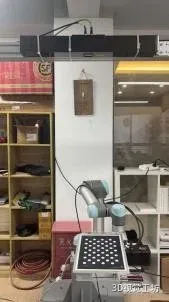
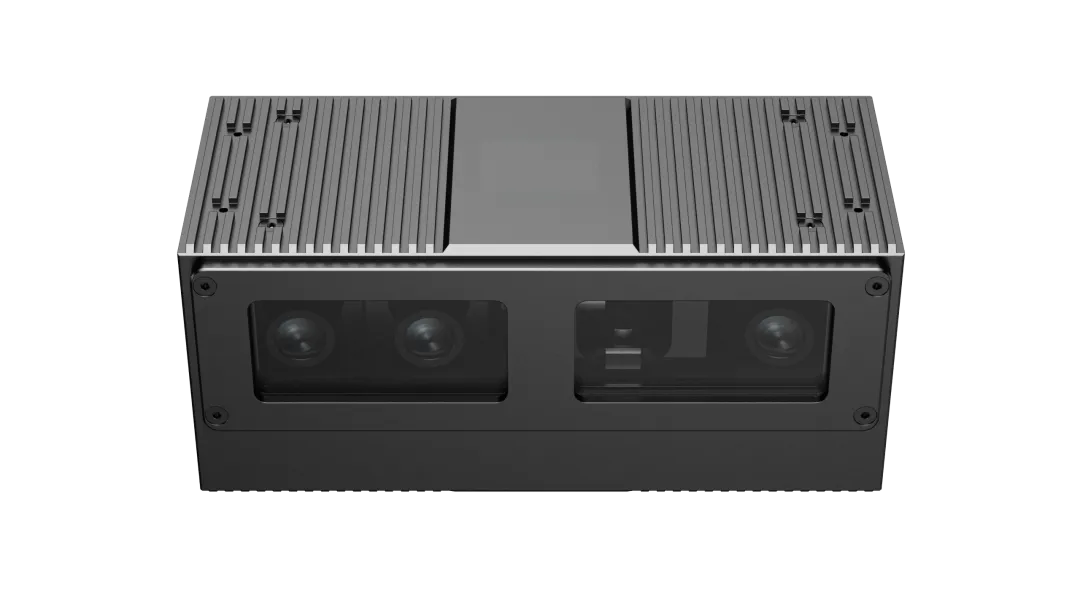 ▲ Equipment used in this tutorial: Aubo C5 mechanical arm + SD-M2600C 3D camera
Note to the press release:
Two types of labels are provided, which are used for each of the following:TCP touch is markedandIdentification of markersIt is recommended that the use of crosses be given priority regardless of the method chosen.Non-symmetrical black-and-white circular plates。
4.2.1 Non-symmetrical black-and-white circle marking boards (recommended)
Support7×11 / 4×11 / 4×5Three specifications that the software will automatically recognize.
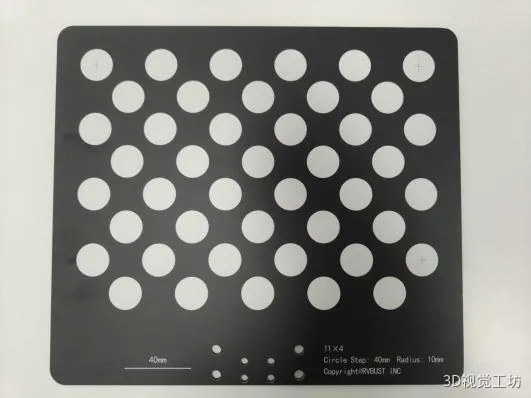
▲ Non-symmetric black-and-white marking boards ((A3/A4 specifications PDF can be printed)
4.2.2 Sympathetic circle markers
Synchronous circle markers are only used in situations where the use of the marking plate is inconvenient. The precision is slightly lower than that of the non-asymmetrical circle point marking plate.
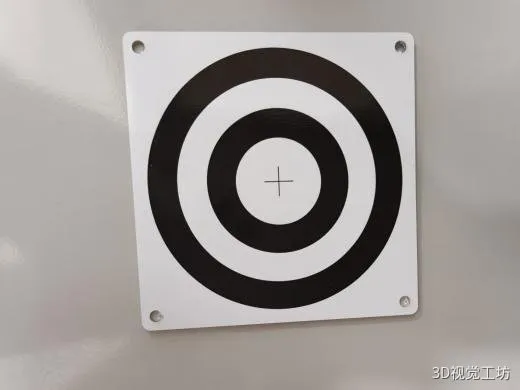
Note 4.3 Tools (only TCP touch is required)
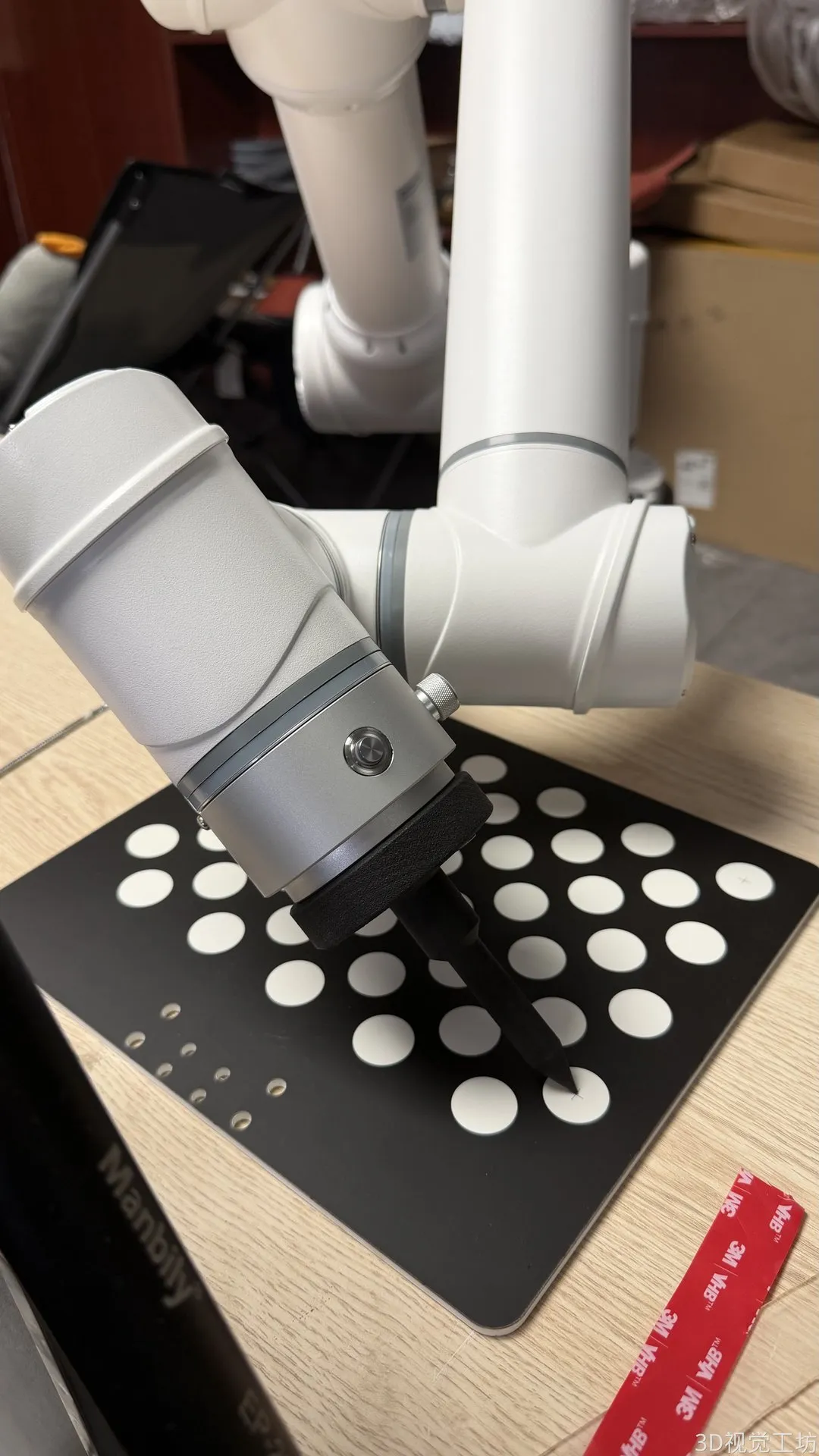
The Aubo C5 is fitted with a nylon-based probe and a TCP touch-pointed top needle.
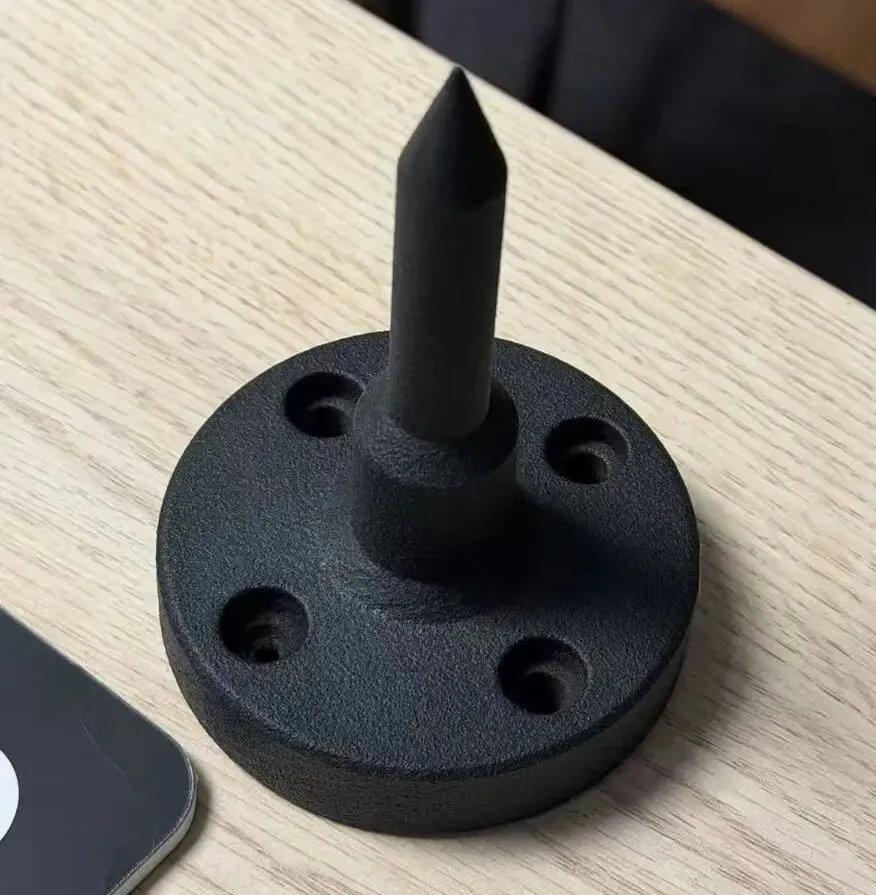
Five, TCP touch is rated
️ Prerequisites:Prior to TCP touch calibration, TCP accuracy verification is required.
For details, please refer to: Hand-eye-marked-TCP touch-marked-pre-TCP accuracy verification, please email: QYong2014
5.1 Steps to data collection
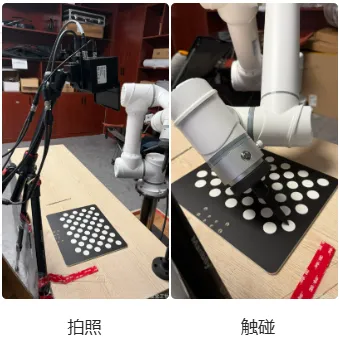
This is the first time I've ever seen an eye-in-hand.
In total, they collected at least3 groups of data:
- Photography: Fixed markers, multiple gestures of mobile mechanical arms, recording 2D images + point clouds + gestures of mechanical arms
- Touch: Moving mechanical arms touch the center point of the cross, recording TCP coordinates
- Optional: Move markers to another fixed location and repeat the above process
- Key: The three-touch gesture difference as big as possible
Note: Multi-angle shots must be taken by moving the mechanical arm at least once for the eyes in the hand.
It's the first time that I've ever been in a relationship with a woman, and it's the second time I've ever been in a relationship with a woman.
In total, they collected at least3 groups of data:
- Photography: fixed cameras, fixed markers, taking and recording 2D images + point clouds
- Touch: Moving mechanical arms touch the center point of the cross, recording TCP coordinates
- Optional: Move markers to another fixed location and repeat the above process
- Key: The three-touch gesture difference as big as possible
Note: No need to record the position of the mechanical arm position when taking pictures for the eyes outside the hand (no calculation)
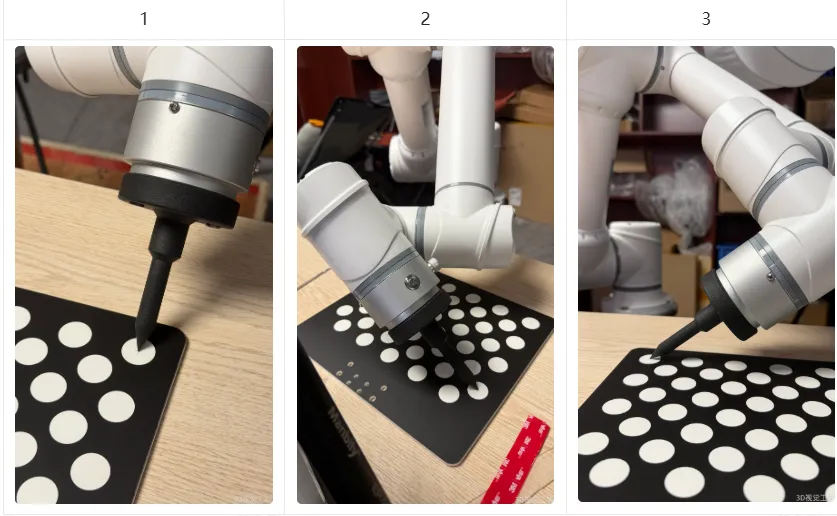
Image recording + point cloud, touch recording TCP coordinates
Please note:For each touchpoint, a "photograph+touch" is equivalent to a set of data; when using an asymmetrical black-and-white diagonal with a cross, it has three touchpoints, a single shot contains three touchpoints, and a subsequent touch provides three sets of data.
5.2 Software operation steps
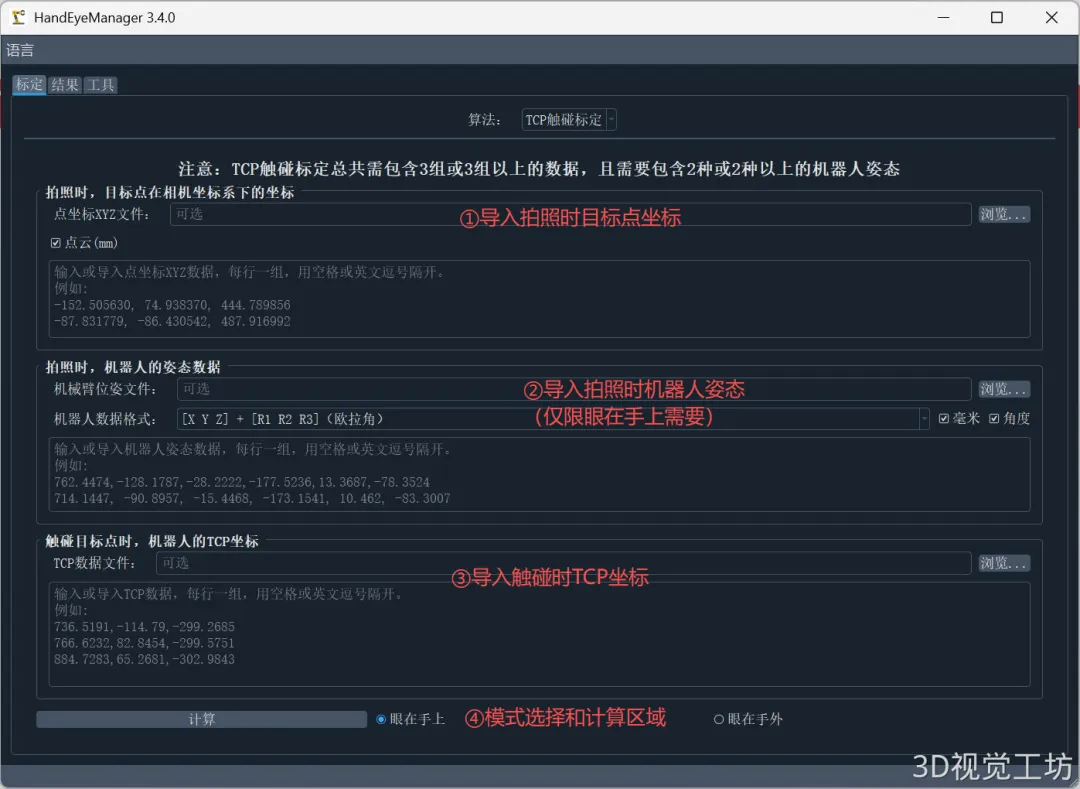
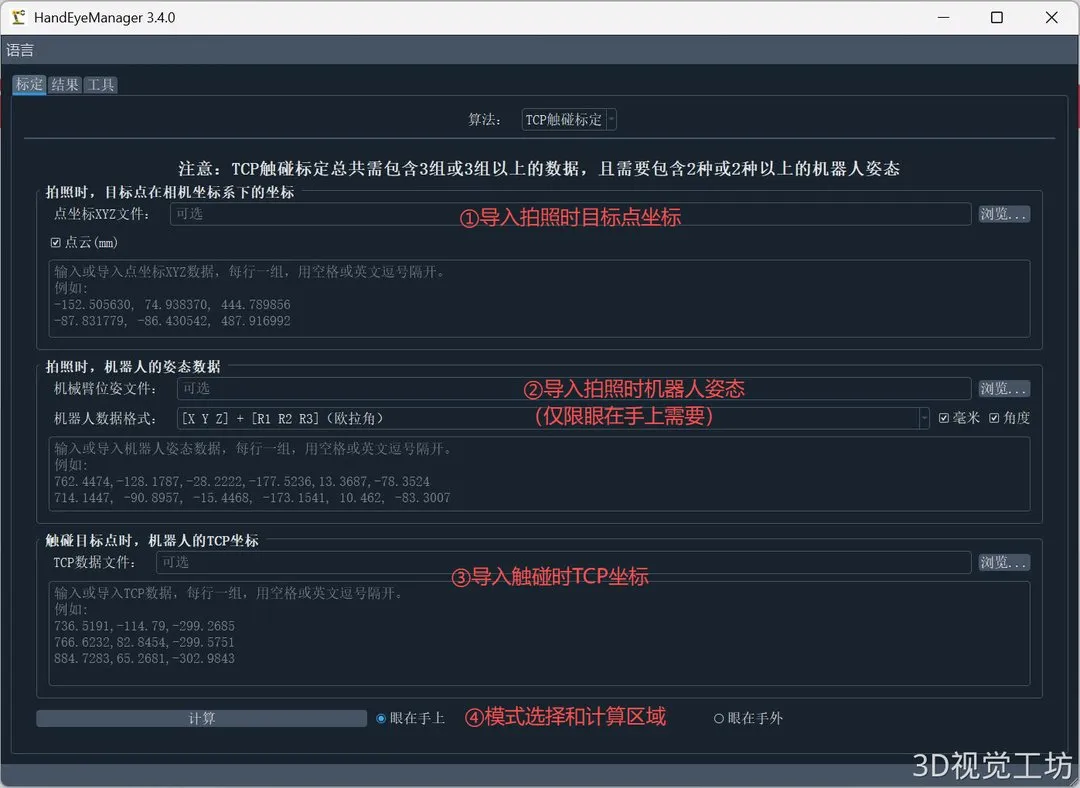
5.2.1 Import the coordinates of the target point when taking the photo
- 3D coordinates under the camera coordinate system when importing or importing a photograph
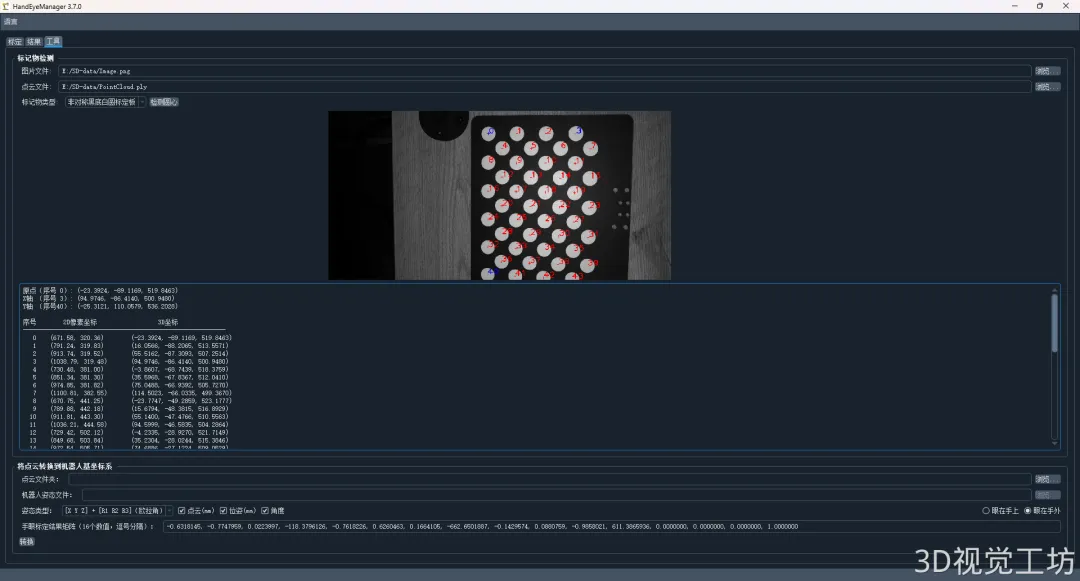
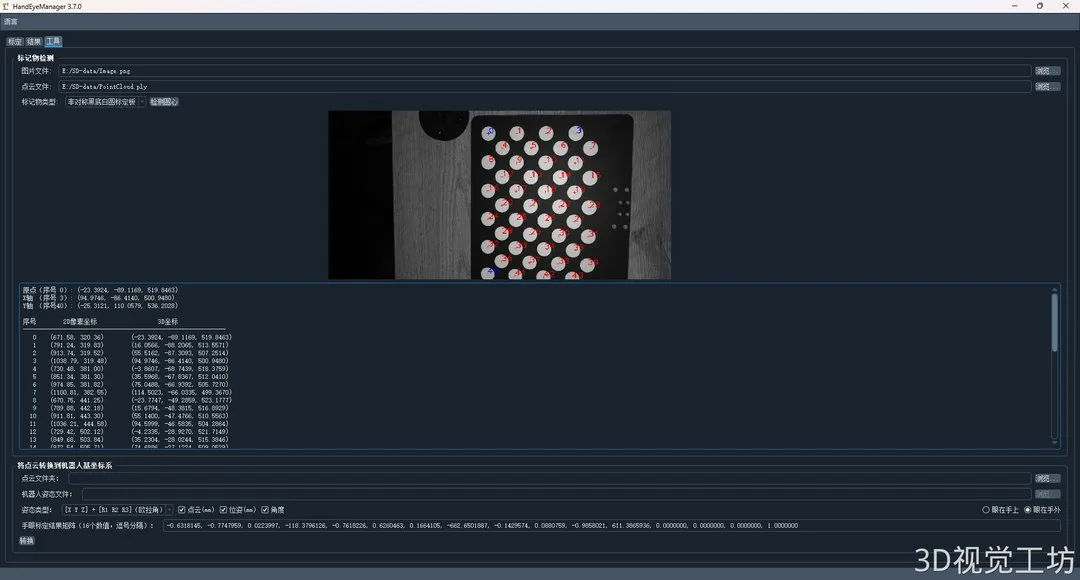
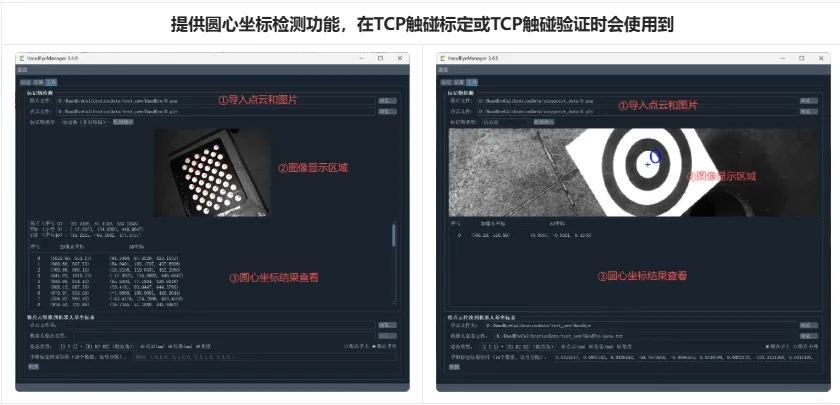
- Using the "tools" page markup detection function, input images and point cloud computing are given XYZ coordinates.
5.2.2 Importing robot gestures when taking photos
- Positions of robots when importing or importing photographs
- The software determines the order of entries in the corners of the aura.
- If you select "out of sight, out of mind" mode, this will be hidden without operation.
5.2.3 TCP coordinates when importing touch
- TCP coordinates when importing or entering touch the target point
5.2.4 Model selection and calculation
- The model of choice:Eyes on your handsOrMy eyes are out.
- Click on the "Calculation"The button is marked.
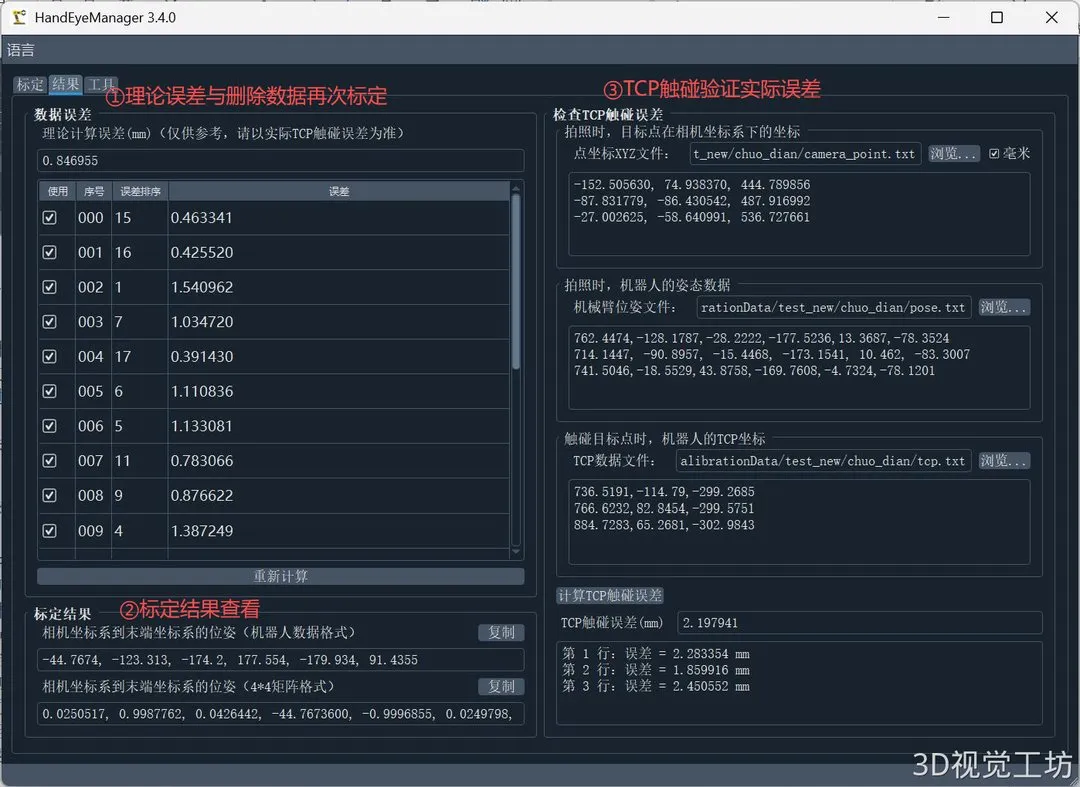
5.3 Analysis of errors
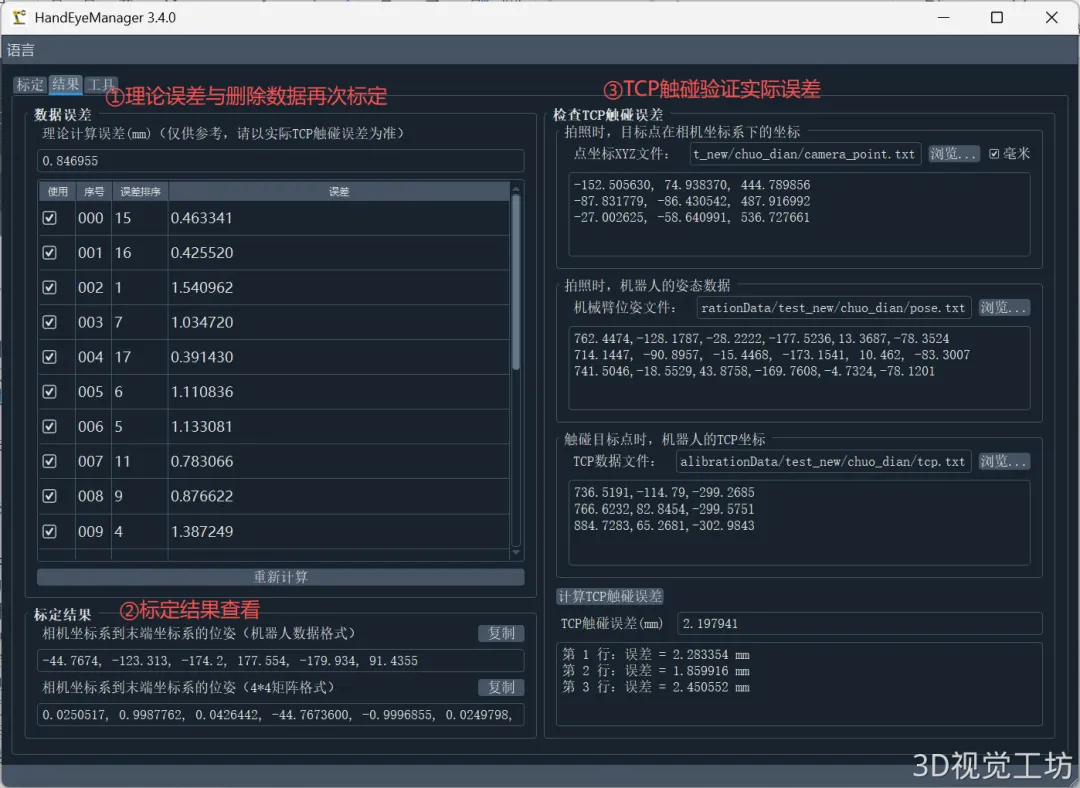
5.3.1 Theoretical errors
- Show the total average calculation error, and the error for each data
- If the error is too large, you can manually delete the abnormal data and then recalculate it.
5.3.2 Check out the rated results
- Eyes on the hand: the conversion matrix of the camera to the end executor
- Out of sight: Matrix of change from the camera to the robot base
5.3.3 TCP touch verifies the actual error
The data format is exactly the same as the data input when computing TCP touch tags, which is equivalent to taking a portion of the computational data for verification.
- Point XYZ: 3D coordinates under the camera's coordinate system
- Robot position: the position of the robot when entering the target point of shooting (only the eyes on the hand required)
- TCP coordinates: the actual TCP coordinates that correspond when input touches the target point
- Click the "Calculate TCP Touch Error" button to show the error at each touchpoint.
5.4 Attention
1 Robot position file format.txt)
Plain text files, with a set of bit position data per row, separated by spaces or English commas between numeric values:
- R1 R2 R3 can be RX RY RZ or RZ RY RX, the software will judge for itself)
- Four-digit number WXYZ: 7 values per row → X Y Z W Qx Qy Qz
- The four-digit number XYZW:7 values per row → X Y Z Qx Qy Qz W(ROS and other system generic formats)
2 Sampling space covered:If the computation is high in accuracy but the actual TCP touches on poor accuracy, the most likely reason is that the sample space is not covered.
3 Reducing the scope of weighting:If the accuracy is not good enough, the conditions allow it to be re-labeled after the scope of work is reduced in order to obtain higher accuracy.
5.5 Reasonable range of accuracy
✅ TCP touch scoring is a reasonable range of accuracy:Theoretical errors about0.5 mmOn the left and right, the general focus point error is also around 0.5 mm.It's less than 1 mm.It's less than 0.5 mm and better.
Six: Marking of markers
6.1 Steps to collect data
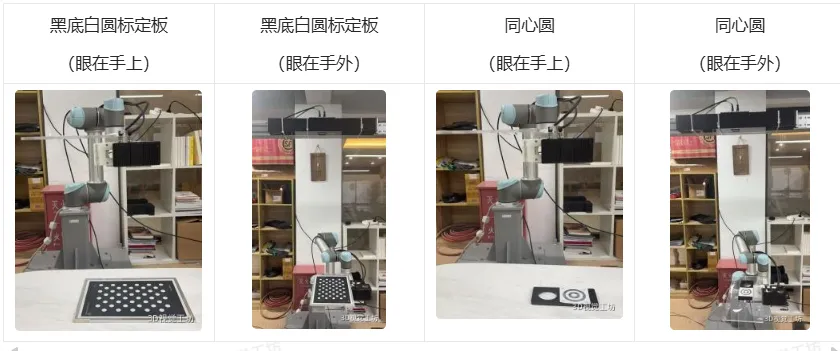
6.1.1 Eyes on the Hands
Fixed markers, multiple postures of mobile mechanical arms, record 2D images + dot clouds + postures of mechanical arms
6.1.2 Eyes out of the hand
Fixed camera, marking objects mounted at the end, mobile mechanical arm multi-gesture photography, recording 2D image + dot cloud + mechanical arm position
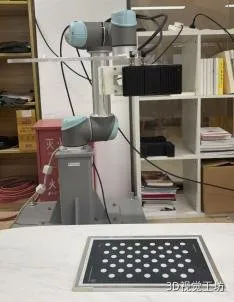
Left: Eyes on the hand (fixed) Right: Eyes off the hand (fixed with the end movement)
It's the first time that I've ever been in a similar situation.
The following is a summary of the data collected:
- It is recommended to rotate each time the position is changed.10°~30°Moreover, avoiding two groups of gestures that are too close to each other
- At least take a shot.Group 6Data and suggestionsMore than 15 groupsIt's important to ensure that the mechanical arm covers the entire work space in a uniform way.
6.2 Software operation steps
️ The dot cloud and the image and the mechanical arm position file should be placed under the same path. The image and the dot cloud are named with a number (e.g. 0.png corresponds to 0.ply) and placed in the same folder.
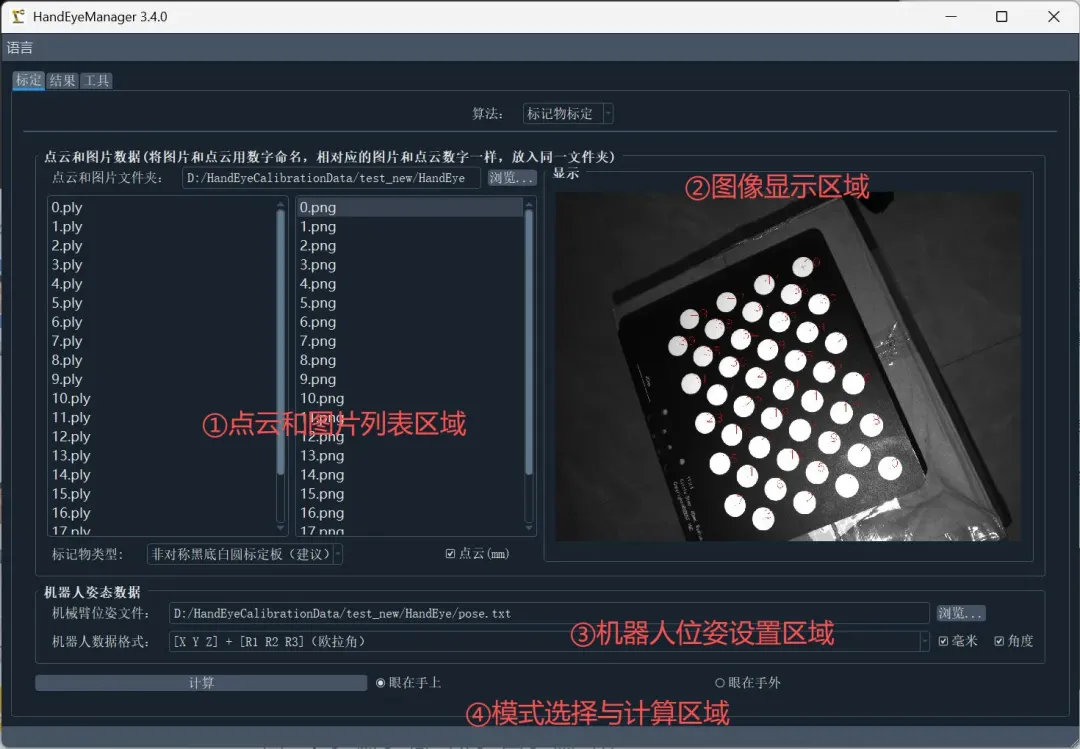
6.2.1 Point cloud and image list area
- Loading images and clouds
- Select the type of marking
- Select a point cloud unit
6.2.2 Images showing the area
- Displays images of markers and identification
6.2.3 Robot positioning area
- It's the first time I've ever seen a robot.
- Select the robot data format
- Select the unit of robot data
6.2.4 Model selection and calculation area
- Select patterns (eyes on or eyes off)
- Click on the "Calculation」
6.3 Analysis of errors
The error analysis method is consistent with 5.3 TCP touch labeling.
6.4 Attention
- PrioritiesNon-symmetrical circle marking boardIt is more accurate than sympathetic circular markers. Sympathetic circles are only used in situations where it is not convenient to use marking boards.
- Ensure that the markers are clearly focused within the camera's depth of field.
- When the eye is on the hand, ensure that the markers are placed firmly in the marking process and cannot move.
- Single-eyed cameras have a front-line shift mode; double-eyed cameras use a point cloud that sweeps the oscillating line; 2D image alignment options must be selected."Yeah", I said.。
- After the robot stops moving, wait a few seconds for the vibration to stabilize and then shoot again.
- Adjusted 2D exposure makes each marking circle clearly visible, but neither too dark nor too bright.
- Adjusted 3D exposure makes the clouds at the center of each circle perfect and smooth.
- A mechanical arm cannot rotate around a single axis, it must change its posture in several directions, and it is recommended that each axis rotate.10°~30°That's it.
- At the very least.Group 6Data and suggestionsMore than 15 groupsIt's the same across all workplaces.
- The image and the point cloud numbering must correspond one by one ((0.png, 0.ply, etc.)).
- BitGIS files support multiple formats:
- In this case, the value of the curve is 6 (X Y Z Rx Ry Rz).
- Four-digit number WXYZ: 7 values (X Y Z W Qx Qy Qz)
- Four-digit number XYZW: 7 values (X Y Z Qx Qy Qz W)
- 4x4 matrix: 16 values ((a matrix of linear transformation ordered by priority)
6.5 Reasonable range of accuracy
The marking of silicon marks the range of reasonable accuracy:The theoretical fallacy is:1~2 mmIf you want a higher accuracy, please select the TCP touch mapping scheme.
Seven, little tools
7.1 Tool 1: Calculate the center coordinates of the markers
Provides circular center coordinate detection functionality, which is used when TCP touch markings or TCP touch verification are used.
7.2 Tool 2: Convert the point cloud coordinates
With hand-eye marking results, point clouds can be converted from the camera coordinate system to the robot base coordinate system, indirectly verifying the accuracy of the marking results by converting point cloud gravity.
QYong2014, consult with 3D cameras.